Introducing Dynamic Outreach

One sequence.
Multichannel Outreach Platform for Adaptive LinkedIn and Email Campaigns

Build one campaign that adapts to each prospect.
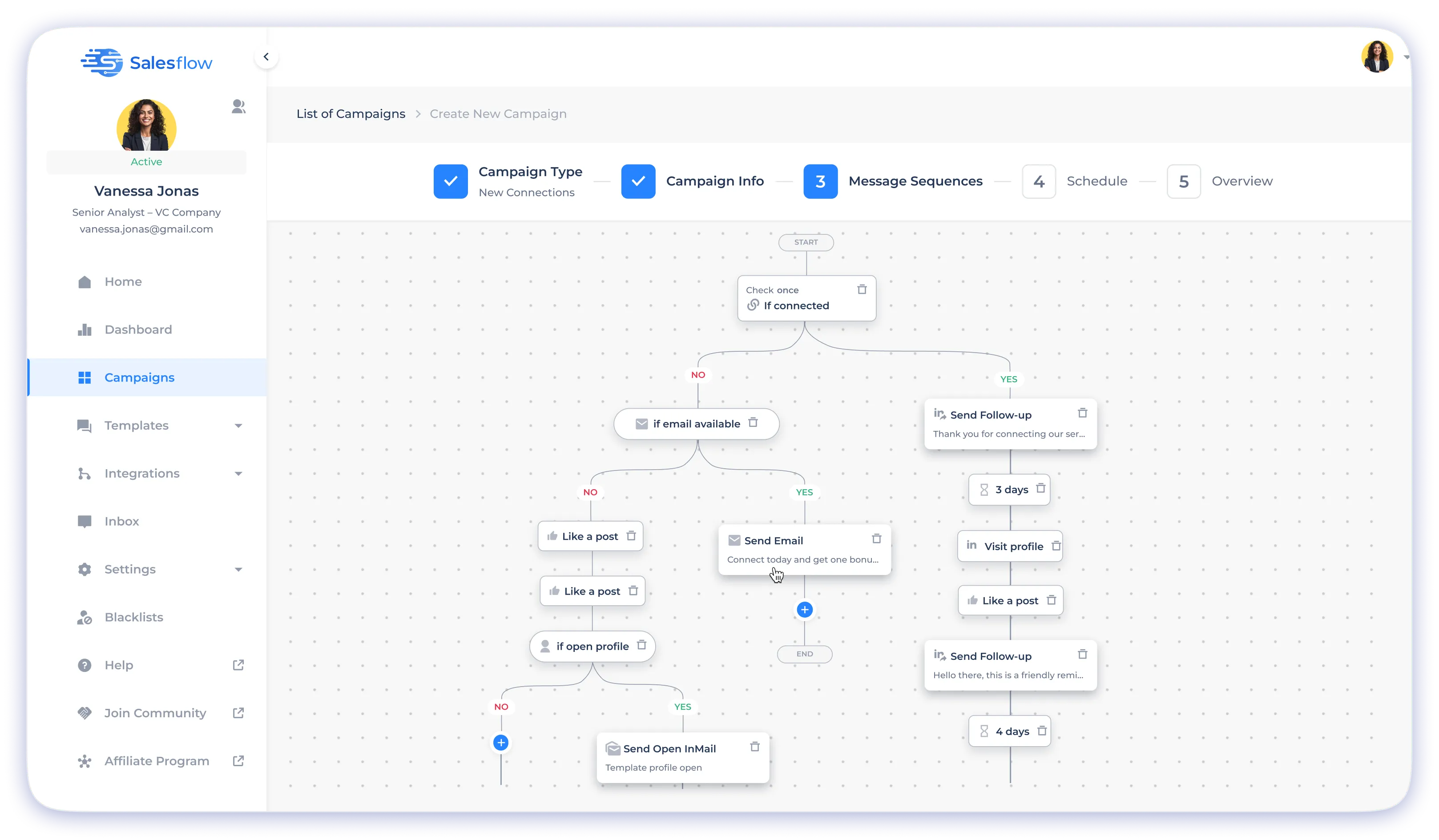
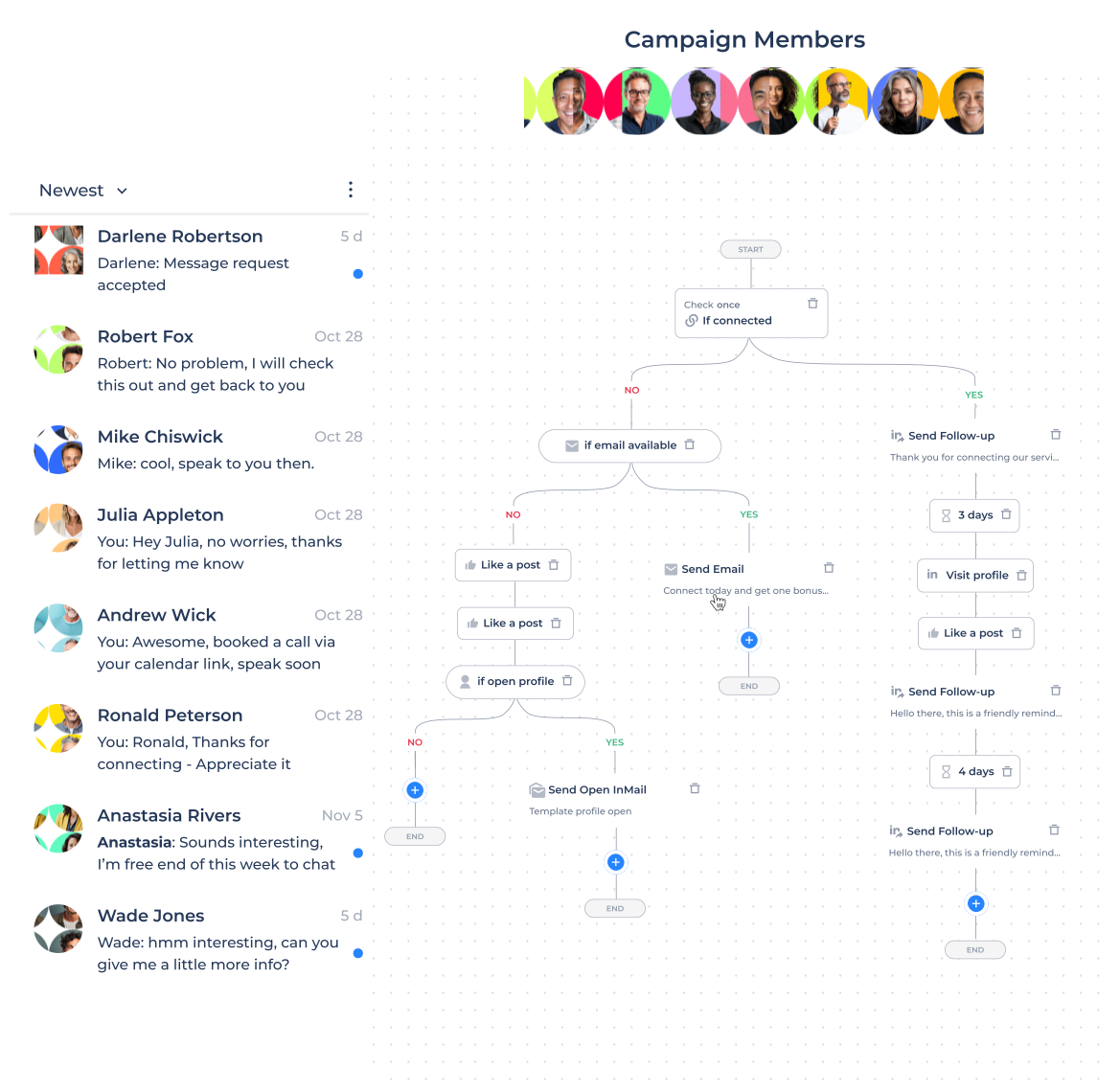
Salesflow Dynamic Outreach combines LinkedIn and email in one conditional workflow. Route prospects based on connection status, Open InMail eligibility, email availability, and email engagement instead of sending every contact through the same fixed sequence.
Use one multichannel outreach platform to manage connection requests, LinkedIn messages, Open InMails, emails, and follow-ups without building a separate campaign for every possible outcome.
Start 7-day free trial

No credit card is required
The Problem

Linear Sequences Send the Wrong Action at the Wrong Time

Most outreach sequences move every prospect forward after a fixed delay. That approach breaks when a contact does not accept an invitation, lacks an email address, replies through another channel, or becomes eligible for a different action.
The Solution

One Dynamic Outreach Campaign With Multiple Outcomes

Dynamic Outreach adds decision rules directly to your campaign. Set the logic once, then route each prospect according to their current connection status, available contact data, and engagement.
It gives teams a more controlled alternative to running separate LinkedIn outreach automation tools and email systems with disconnected campaign logic.
Condiitons

Four Prospect Signals Control Every Campaign Branch

Use four conditions to decide which channel or action should come next.
Practical Workflows

Build LinkedIn and Email Workflows From One Campaign

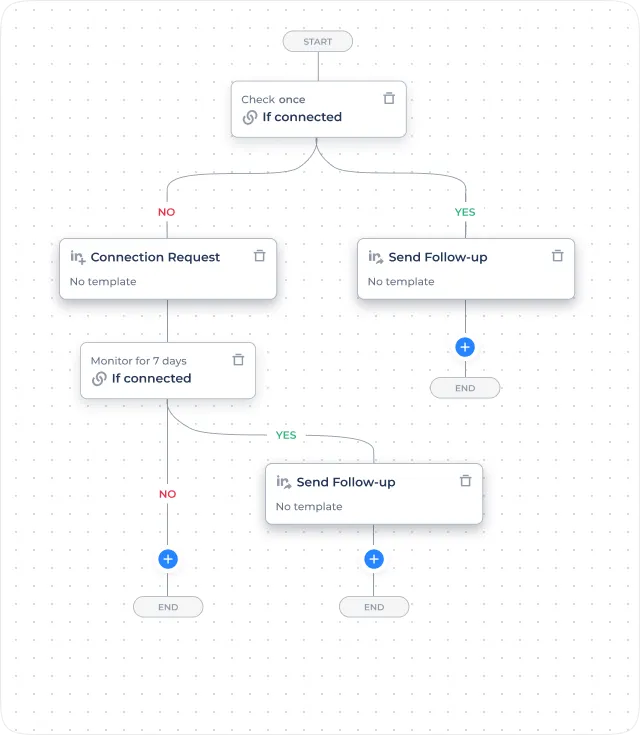
Connected vs. not connected

Send existing connections directly to a LinkedIn follow-up. Send non-connected prospects a connection request first.
  • if connected — Check whether the prospect is a first-degree connection.
  • Yes: Send follow-up — Send connected prospects a relevant follow-up.
  • No: Send connection request — Send non-connected prospects a connection request.
  • Monitor: If connected — Monitor for connection acceptance.
  • Yes: Follow-up —  Continue the follow-up path after acceptance.
  • No: End —  End or redirect the path when the prospect does not connect.
  • This combines LinkedIn connection request automation and follow-up messaging without creating separate campaigns.

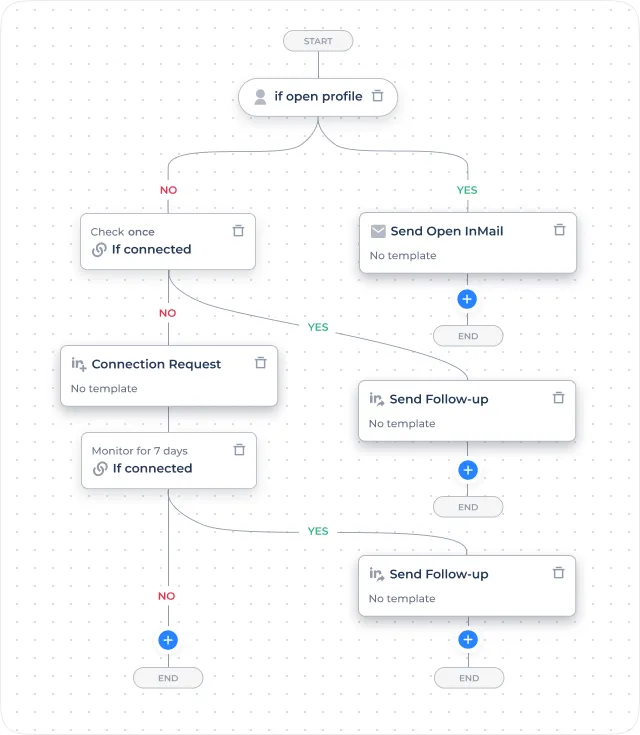
Open InMail routing

Check Open InMail eligibility before selecting the action.
  • if open profile — Check whether the prospect has an Open Profile.
  • Yes: Send open InMail — Send an Open InMail when eligible.
  • No: Send connection request — Use a connection request when Open InMail is unavailable.
  • Monitor: If connected — Monitor connection status.
  • Yes: Send follow-up — Send the next LinkedIn message after the connection is accepted.
  • The condition removes the need to manually separate eligible and ineligible profiles before launching the campaign.

Salesflow Activity Over the Previous 30 Days

Show live platform activity with an automatically updated reporting period.

Recommended Metric Labels

LinkedIn Invitations Sent Through Salesflow

Average Connection Acceptance Rate

Prospect Replies Recorded

Average Campaign Reply Rate

New LinkedIn Connections Created

Platform statistics reflect observed activity across measured Salesflow accounts during the displayed reporting period. They do not guarantee individual campaign results. Define the denominator, qualifying campaigns, excluded accounts, and data-refresh date for every percentage shown.

Reduce Campaign Duplication and Manual Routing

Replace fragmented LinkedIn and email campaigns with one conditional sequence.
Dynamic Outreach helps teams coordinate prospecting actions, apply consistent stopping rules, and route prospects according to available channel and engagement signals.
One Adaptive Campaign

Manage several common prospect outcomes without rebuilding parallel campaign structures.

Four Condition Types

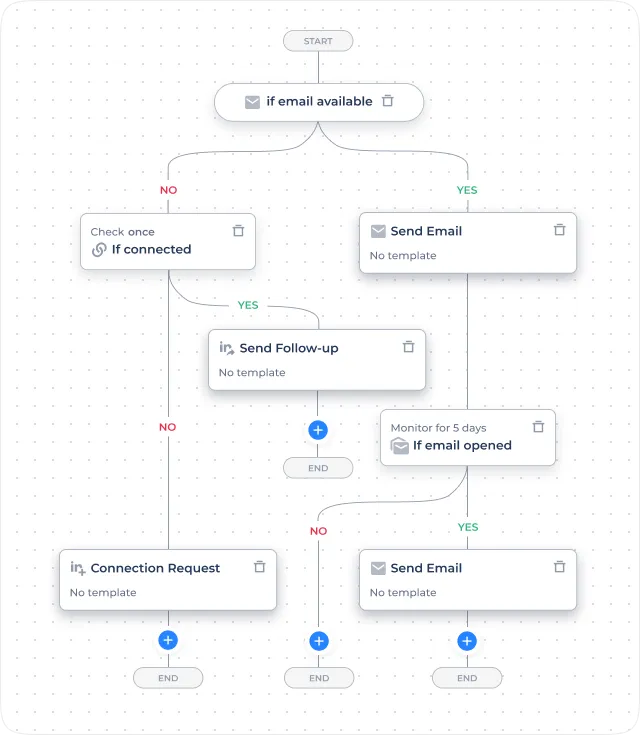
Use connection status, Open Profile eligibility, email availability, and email engagement to control campaign branches.

Reply-Based Stopping

Stop pending actions when a prospect replies, reducing duplicated follow-ups across LinkedIn and email.

CRM-Connected Outreach

Connect Salesflow with supported CRM and integration workflows to synchronize contacts, messages, replies, and campaign activity with the wider sales process.
Workflow Safeguards

Controls That Prevent Common Campaign Errors

Dynamic Outreach uses validation rules and stopping conditions to prevent invalid workflow paths.

Prevent Duplicate Connection Requests

Configure one valid invitation path and avoid repeated request loops within the same workflow.

Block Follow-Ups to Non-Connected Prospects

Allow LinkedIn follow-ups only after the required connection status is confirmed.

Check Open InMail Eligibility

Use the Open Profile condition before attempting an Open InMail action.

Require an Active Email Integration

Confirm that an email connection is available before launching a campaign containing email actions.

Stop After Replies

Mute the prospect and stop pending outreach after a reply is recorded.

Follow Configured Working Hours

Run scheduled actions according to the working hours and time zone selected for the campaign.
Outreach ROI

Quantifiable efficiency in every flow

Replace fragmented sequences with a single, high-performing campaign. Scale your volume with zero manual overhead and intelligent branching that ensures no lead is left behind.
1

campaign replaces many

0

manual checks per contact

4

conditions that drive every branch decision

7

7 days trial · no card needed

Safety First

Smart safeguards built in

Adaptive logic without structural risk. Validation rules prevent common outbound mistakes.
  • No duplicate connection requests — one per branch, no re-invite loops
  • No follow-ups to non-connected contacts — blocked unless 1st-degree
  • Open InMail only when appropriate — "if open profile" applied automatically
  • Email requires active integration — campaigns can't start without it, no silent failure
  • Replies stop the sequence immediately — any reply mutes the contact instantly
  • Working hours enforced — all actions respect your schedule and timezone
Get Started

Stop Building Parallel Campaigns

Build one adaptive sequence that changes according to prospect status and engagement.
Use Dynamic Outreach as a personalized LinkedIn outreach tool, email workflow builder, and sales prospecting tool for LinkedIn within the wider Salesflow platform.