Ariel feature · AI SDR for sales teams

An AI SDR for sales teams that gives reps their selling time back

Ariel finds the right prospects, verifies how to reach them and runs the first touches across email and LinkedIn. Every reply lands in one inbox, already sorted, so your reps spend the day in conversations instead of lists and admin.

  • Every AI-written message approved by a rep before it sends
  • Email, LinkedIn and call tasks in one sequence
  • Interested replies flagged to the team the moment they land
4.5 rating on G2
Review · Today
🔵
One queue for the day Drafts, replies and call tasks in one place
JD
Jordan Diaz · Ops Manager Replied on email and asked for times
Interested
AL
Alderway Logistics Draft ready, opener cites a hiring spike
Approve
TS
Tom Silva Call task, brief with last five touches
Call task
RK
Riya Kapoor Asked to talk next quarter
Not now
Nothing sends without a look. Each draft carries its research, so a rep can approve, edit or skip in seconds.

Trusted by 10,000+ users across all sizes and industries

HubSpotClient logoClient logoClient logoClient logoClient logoClient logoClient logoClient logoClient logoClient logoClient logoClient logoClient logoHubSpotClient logoClient logoClient logoClient logoClient logoClient logoClient logoClient logoClient logoClient logoClient logoClient logoClient logo
01 · THE PROBLEM

Your reps are short of selling hours, not targets

Most of a rep's week goes on prospecting work nobody hired them for. None of it shows on a scoreboard, but it eats the time that should go on the next conversation.

≡

Lists built by hand

Hours a week copying prospects out of spreadsheets and LinkedIn tabs.

⚠

Guessing what bounces

Emails checked one at a time, and a sending domain still takes the hit.

↻

Follow-ups that slip

Replies spread across inboxes, and the fourth touch that never gets sent.

02 · WHAT ARIEL TAKES ON

What Ariel takes off your sales team's plate

Ariel works the top of the funnel every day. Your reps keep the calls, the objections and the close.

◎

Finds the right people

Describe who you sell to and Ariel searches by title, industry and location, or finds lookalikes of your best accounts.

✓

Verifies how to reach them

Waterfall enrichment finds work emails and phone numbers. Every email is verified before you are charged.

✉

Writes and runs the sequence

Email and LinkedIn steps written for each prospect from their own data, with call tasks queued for reps.

◆

Sorts every reply

Replies are labelled Interested, Objection, Not now, Out of office, Unsubscribe or Other as they arrive.

03 · HOW IT WORKS

How the AI SDR works
with your sales team

STEP 01

Find

Ariel builds a list from your ideal customer profile, a lookalike search or a Sales Navigator import.

→
STEP 02

Verify

Missing emails and phone numbers are found and checked. Duplicates merge on the way in.

→
STEP 03

Engage

One sequence across email and LinkedIn, with call steps queued for the power dialer. A rep approves each draft.

→
STEP 04

Hand over

Interested replies alert the team, and a meeting found on a connected calendar is credited to its campaign.

04 · ONE INBOX

Every reply in one inbox, sorted before your rep opens it

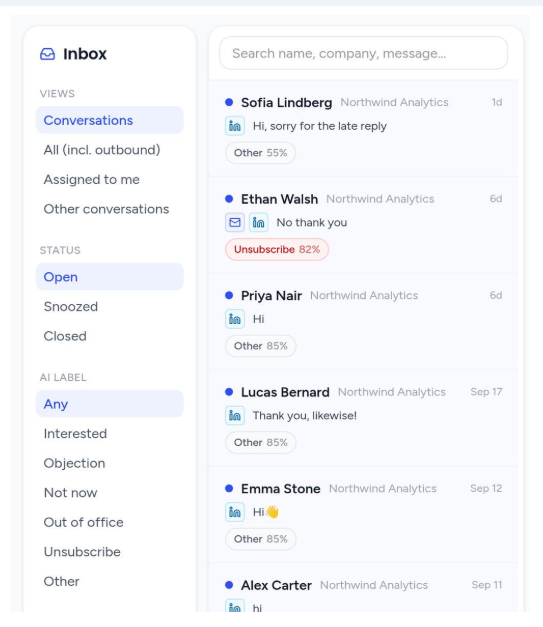
Email and LinkedIn replies collapse into one conversation per prospect. Ariel labels each one, so reps start the day with the interested replies instead of hunting through tabs.

✓

Filter by label or channel, and assign any conversation to a teammate

✓

Ask for an AI draft written from the conversation, then edit and send

✓

An unsubscribe reply blocks future sends across the workspace
See how the power dialer briefs every call →
Ariel · One inbox
Salesflow Ariel unified inbox with email and LinkedIn replies labelled by intent
The unified inbox, with replies filtered by AI label. Demo workspace with sample data.
05 · A REP'S DAY

A rep's Tuesday,
before and after Ariel

One illustrative day, not a promised result. The second column has more selling in it, not more software.

TIME BEFORE WITH ARIEL
8:00 to 9:00 Builds a list of 40 prospects from spreadsheets and LinkedIn tabs Reviews a lookalike list Ariel built from one of the team's best accounts
9:00 to 10:00 Checks which emails are likely to bounce Approves the day's drafts in Focus Mode, editing two openers
10:00 to 12:30 Writes openers one by one and sends connection requests Two discovery calls with leads whose replies were labelled Interested overnight
1:30 to 2:30 Updates a spreadsheet tracker nobody else opens Works two accounts flagged by a hiring signal on a watchlist
2:30 to 4:00 Chases follow-ups that went unanswered last week Runs a power dial session, each call with a brief attached
06 · COMPARE

Hiring another SDR vs
adding Ariel

Hiring another SDR

More hours, same manual work

  • Months to hire and ramp before the first meeting
  • Research, list building and follow-up still done by hand
  • Coverage drops when they are busy, off or leave
  • Quality varies from rep to rep

Adding Ariel

The prospecting work handled, every day

  • Starts on the first list you add
  • Finding, verifying and first touches run daily
  • Reps keep the conversations and the close
  • Every message reviewed by a person before it sends
Read the full comparison: AI SDR vs hiring an SDR →
Built so reps trust what goes out in their name
07 · Guardrails

Built so reps trust what
goes out in their name

No autopilot

Every AI-written message waits for a person to approve, edit or skip it. There is no switch that turns that off.

Suppression on every send

Unsubscribes, hard bounces and do-not-contact entries are checked before every send and every dial.

in

LinkedIn inside its limits

Actions are spaced across working hours, within the daily limits set for each rep's account.

Why sales teams run on Salesflow
The platform behind Ariel

Why sales teams run on Salesflow

10,000+

users running outbound on Salesflow

120+

countries with teams using Salesflow

★★★★★ 4.5 on G2

Rated 4.5 by users on G2

Getting Started
Getting started

Run the first pilot without losing the room

One rep, one list, one sequence, reviewed from day one.

1

Connect one rep

Their Google mailbox and their own LinkedIn account. Start with one rep, not the whole floor.

2

Build a lookalike list

Seed it with one of that rep's best current accounts.

3

Review every draft for a week

Then decide how widely to roll out, based on replies and meetings.

FAQ

AI SDR for sales teams: questions before you buy

What is an AI SDR for sales teams?

An AI SDR for sales teams takes on the prospecting work around a rep's day: finding the right people, getting verified contact details, writing first touches and sorting replies. With Ariel, a rep approves every message before it sends and keeps the calls, objections and close.

Will Ariel replace my SDRs?

No. Ariel removes research and admin so SDRs and AEs spend more of the week in conversations. People still run the calls, handle objections and close. Ariel does not place calls itself either: a call step becomes a task for a rep in the power dialer.

Which channels does Ariel use?

Email and LinkedIn in the same sequence, with call steps queued as tasks for a rep. LinkedIn steps include connection requests, messages, InMails, profile views and post likes, all sent from the rep's own account and paced within its daily limits.

What happens when a prospect replies mid-sequence?

The reply is read and labelled automatically. You choose per campaign whether any reply, or only a human reply, stops the sequence, so nobody gets chased after they have answered. Interested replies move to Replied and alert the workspace.

Can managers see what goes out in the team's name?

Yes. Owners and admins see the whole review queue and a per-rep view of reach, reply rate and meetings. Every sent email is recorded with the mailbox it went from.

Does Ariel update our CRM?

Ariel reads contact lists from connected CRMs and can re-read a list every night. It does not write back to your CRM today, so stages and activity are tracked in Ariel's own pipeline board and inbox.

How much does Ariel cost for a sales team?

Pricing depends on your team and volume. Book a demo and we will walk you through it, using one of your own lists.

More from Ariel
Keep reading

More from Ariel

See Ariel build pipeline on your market

Book a 30 minute demo and watch Ariel find buyers, write the outreach and line up meetings, with you approving every move.

Book a Demo See Ariel