Describe an outbound play in plain English and Ariel, the AI SDR, builds it: the trigger, the email, LinkedIn and call steps, and when to stop. Plays fire on real events in your CRM, and every message waits for your approval before it sends.
Trusted by 10,000+ users across all sizes and industries
Most sequences start because someone uploaded a list. A play starts because something happened: a deal moved, a lead came in, a meeting fell through. Ariel acts while that moment still matters.
Plays fire on a CRM event or inbound webhook, so outreach follows a real change, not a calendar.
Describe the play in a sentence. Ariel drafts the trigger, steps and exit for you to check.
Up to 15 steps across email, LinkedIn and rep call tasks, with up to two branches.
Dedupe, cooldown, a daily cap and suppression decide who can enter a play before anything is drafted.
You never build a sequence node by node. You say what should happen, check what Ariel drafted, and keep the final say on every message.
Tell Ariel in chat, for example: "when a deal hits Proposal in our CRM, enrich the contacts and start the follow-up sequence."
Check the trigger, the assumptions Ariel made and the connected apps, then approve and launch, or discard.
A matching CRM event or webhook starts a run. Guardrails check the contact, and missing details can be enriched first.
Every draft lands in Needs review with the trigger sentence and consent basis. Approve, edit or reject it.

Describe a play in plain English and Ariel drafts it for your approval. Demo workspace with sample data.
Start with the moments your pipeline already produces. Each play names its trigger, its steps and the point where it stops.
A deal moves into a stage you choose in your CRM
Email on the stage change, LinkedIn note two days later, second email five days after
A reply, or three touches with no response
A new record arrives from your CRM or an inbound webhook
Fast follow-up email, rep call task in the Power Dialer, LinkedIn message
A meeting booked, or an unsubscribe
A webhook from your scheduling tool, or a CRM update
Email offering a new time, LinkedIn nudge, final low-pressure email
The meeting is rebooked, or any reply
A deal is marked Closed Lost in your CRM
New-angle email after a wait, LinkedIn message a week later
Any reply. No reply returns the contact to the pool
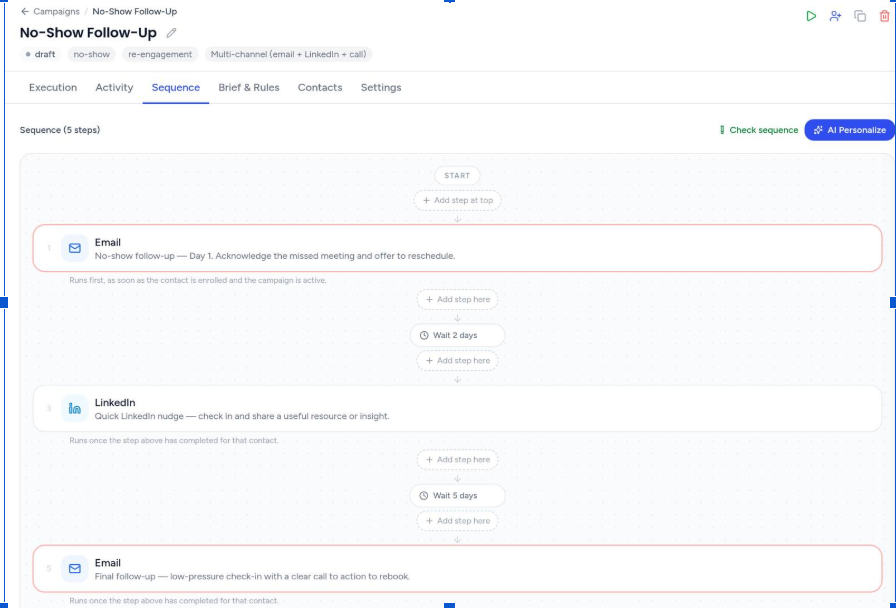
The steps behind a no-show follow-up: email, a LinkedIn nudge and a final email, with waits between. Demo workspace with sample data.
Plays never send on their own authority, in any mode. What runs automatically is the safety layer underneath, so the same person is not contacted twice and a broken connection never fails quietly.
Dedupe window: repeat triggers collapse into one run
Cooldown before the same person can re-enter a play
Default daily cap per play
To approve, edit or reject each drafted message
Suppression is checked when the trigger fires and again before the send
An unsubscribe excludes the contact from every play and campaign
A play flags itself Needs attention if a connected app disconnects
Every play stops here each time it fires
Built step by step, started by a list upload
Described in a sentence, started by real events
Users running outbound on Salesflow in over 120 countries
Per play, across email, LinkedIn and rep call tasks
Rated 4.5 by users on G2 (existing social-proof SVG)
No sequence built from scratch and no implementation project.
Connect the CRM or app whose events should start your plays.
Tell Ariel the trigger, the channels and when to stop, in plain English.
Approve the draft play, then each message as it fires. The run timeline shows every step.
Sales playbook automation turns a repeatable sales motion into a play that starts on its own trigger: when a specific event happens, a set of outreach steps begins and stops at a clear exit. In Ariel, plays fire on CRM events or inbound webhooks, and every message still waits for a human to approve it.
A sales play is one situation-specific motion, with a trigger, steps and an exit, such as following up when a deal reaches Proposal. A sales playbook is your collection of plays. In Ariel, the Plays page holds them all, with each play's status, runs and outcomes in one place.
Events from a connected app: a deal stage change or a new record in your CRM, or an inbound webhook from any tool that can send one, such as a scheduling tool. Ariel's own signals, such as Intent Radar, Visitor ID and Watchlists, do not start plays directly today. A rep acts on them instead.
No. Every message a play drafts waits in Needs review for a human to approve, edit or reject, and approved messages send within the campaign sending window. There is no setting that turns approval off.
Describe it in Ariel chat in plain English, for example "when a deal hits Proposal, enrich the contacts and start the follow-up sequence." Ariel drafts the play, and you check the trigger, assumptions and connected apps before you approve and launch it.
A 24-hour dedupe window collapses repeat triggers into one run, a 7-day cooldown stops the same person re-entering a play too soon, and a daily cap of 25 runs per play applies by default. Suppression is checked before every send, and an unsubscribe applies to every play and campaign.
Yes. Pause, resume, archive or restore any play from its menu. To change the wording, channels or timing, describe the change to Ariel in chat.
Up to 15 steps, including up to two branch steps, across email, LinkedIn and rep call tasks. Calls are never placed automatically: an approved call step becomes a task for a rep in the Power Dialer.
Playbooks are part of Ariel, the AI SDR. Book a demo and we will walk you through pricing for your team and volume.
Book a 30 minute demo and watch Ariel find buyers, write the outreach and line up meetings, with you approving every move.
Book a Demo See Ariel