Ariel use case · AI sales workflow automation

AI sales workflow automation, from first list to booked meeting

Ariel runs outbound as one connected workflow. It finds buyers, verifies their details, writes email and LinkedIn outreach, sorts every reply and tracks the meetings that follow. You review the list and approve every message, so nothing sends without you.

  • One workflow instead of a stack of disconnected tools
  • Every AI-written message approved before it sends
  • Replies sorted into six types the moment they land

4.5 rating on G2
Workflow · Running now
One prompt, five connected stages Ariel sales workflow · sample data
Live
1
Find: List built from your described buyer 412 contacts proposed.
Done
2
Enrich: Emails verified before you're charged Verified list waits for you to launch.
You review
3
Engage: Email and LinkedIn drafts per contact Held in the review queue.
You approve
4
Reply: Every reply labelled on arrival Interested alerts your team.
Automatic
5
Meeting: Booking spotted on your calendar Credited to the campaign.
Tracked
Two checkpoints, not twenty. A person decides at the list and at every message. Everything between runs on its own.

Trusted by 10,000+ users across all sizes and industries

HubSpotClient logoClient logoClient logoClient logoClient logoClient logoClient logoClient logoClient logoClient logoClient logoClient logoClient logoHubSpotClient logoClient logoClient logoClient logoClient logoClient logoClient logoClient logoClient logoClient logoClient logoClient logoClient logo
01 · WHY TEAMS SWITCH

Sales workflow automation that connects every step

Most outreach tools automate the sending and leave the rest to spreadsheets, a CRM and a busy inbox. Ariel runs list building, verification, outreach and replies as one workflow, so nothing falls through the gaps between tools.

▢

One place, not five tools

Prospects, data, sequences and replies live in one workspace, with one conversation per prospect.

✓

Clean data before sending

Emails are verified before you are charged, and suppression is checked before every send and every dial.

✎

Approval built in

Every AI-written message waits in a review queue. There is no autopilot switch to forget about.

↩

Replies handled for you

Out-of-office notes, unsubscribes and objections are labelled on arrival, so reps read the replies that matter.

02 · HOW IT WORKS

How the automated sales workflow runs, from list to meeting

Five stages and two human checkpoints. Everything between them runs on its own.

STEP 01

Find

Describe your buyer in plain English, find lookalike companies or import a Sales Navigator search.

STEP 02

Enrich

Waterfall enrichment adds work emails and phone numbers. Every new email is verified before a credit is used.

CHECK A

You review and launch

Check the verified list. A campaign only starts when a person launches it.

STEP 03

Engage

Ariel writes email and LinkedIn steps for each contact from their own data and your brief.

CHECK B

You approve

Every AI-written draft waits in the review queue: approve, edit, regenerate or reject.

STEP 04

Reply

Every reply gets one of six labels. Interested replies move to Replied and alert your team.

STEP 05

Meeting

A Meeting step watches your connected calendar and credits the booking to the campaign.

Runs automatically A person decides
03 · SET UP IN PLAIN ENGLISH

Automate a sales workflow by describing it

Tell Ariel what should happen, for example “when a deal hits Proposal in our CRM, enrich the contacts and start the follow-up sequence”. Ariel drafts the play, and you check the trigger and assumptions before it goes live.

✓

Triggered by events in your connected CRM or an inbound webhook

✓

Guardrails built in: a 24-hour dedupe window, a 7-day cooldown per person and a daily run cap

✓

Messages a play writes still wait for your approval

Explore Ariel playbooks
Ariel Playbooks – Plays screen
Describe a play in plain English and Ariel drafts it for your review. Demo workspace with sample data.
04 · HUMAN IN THE LOOP

AI sales automation with a human check on every message

Your name and your domain go on every message, so review is never optional. Ariel makes it fast instead.

Review · Before anything sends
A

Review queue and Focus Mode

Approve, edit, regenerate or reject each draft, or clear the day's queue in Focus Mode with keyboard shortcuts.

Fast review
B

What you approve is what sends

Approved text is frozen. A draft with a broken rule or an unfilled detail is held, with the exact problem shown.

No surprises
C

Your rules, checked first

Must-hold writing rules are checked before a draft reaches you. Protective actions, like pausing a campaign, always go through.

Guardrails
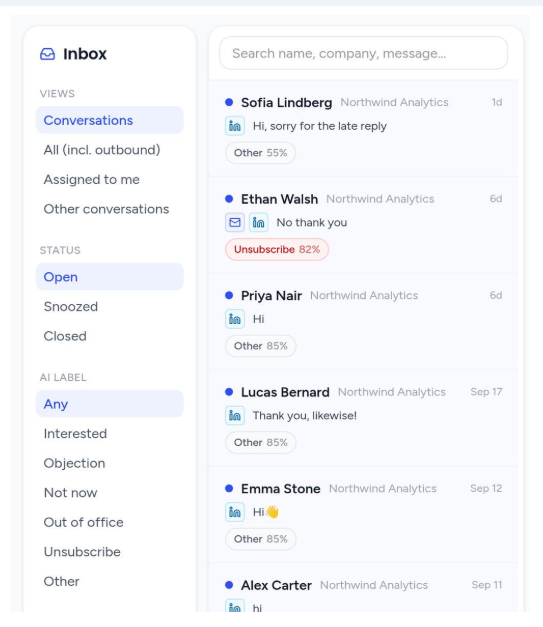
Ariel Inbox
Email and LinkedIn replies in one inbox, labelled on arrival. Demo workspace with sample data.
05 · REPLIES AND MEETINGS

Every reply sorted, every meeting credited

Email and LinkedIn replies land in one inbox, one conversation per prospect, already labelled.

✓

Six labels: Interested, Objection, Not now, Out of office, Unsubscribe and Other

✓

Interested replies move the prospect to Replied and alert the whole team

✓

Clear unsubscribe requests block future sends automatically

✓

A Meeting step moves the prospect to Meeting booked when the meeting appears on your calendar

See how Ariel qualifies replies →
06 · Compare

Ariel vs a stitched-together sales stack

A stitched-together stack

  • Separate tools for data, sending and replies
  • Export a list, enrich it, then re-import it
  • Sequences in one tool, replies in another
  • Replies sorted by hand, out-of-office included
  • Autopilot can send before anyone checks
  • Meetings tracked in a spreadsheet

Ariel AI sales workflow automation

  • One workflow from list to meeting
  • Enrichment runs as contacts arrive
  • Email and LinkedIn in one sequence and one inbox
  • Six reply types labelled on arrival
  • Every AI-written message approved before it sends
  • Meetings credited to the campaign that earned them
Platform Behind Your Enrichment
PROOF

The platform behind
your sales workflow

10,000+

Users running outbound on Salesflow in over 120 countries

2 checkpoints

A person signs off on the list and on every message

★★★★★ 4.5 on G2

Rated 4.5 by users on G2

Getting Started
Getting Started

Run your first automated workflow this week

No implementation project. Start small, watch the drafts, then widen.

Step 1

Describe your buyer

Job title, industry and location, in plain English, to build the first list.

Step 2

Review every draft

Approve the first week of messages one by one and sharpen your brief as you go.

Step 3

Widen one segment

Move to a bigger list only once the small one looks right.

FAQ

AI sales workflow automation questions

What is AI sales workflow automation?

AI sales workflow automation uses AI to run the connected steps of outbound selling: finding prospects, getting their contact details, writing outreach, sorting replies and tracking meetings. In Ariel these run as one workflow, and a person approves the list and every AI-written message.

What is the difference between a sales workflow and a sales sequence?

A sequence is the set of messages a contact receives. A workflow covers everything around it: where the list came from, whether it was verified, what happens on reply, and who approves what.

Can the workflow send messages without manual review?

No. Every AI-written message waits in the review queue before it sends, and approval cannot be switched off. Focus Mode helps your team clear a day's drafts quickly.

Which channels does the workflow cover?

Email and LinkedIn run in the same sequence and land in the same inbox. Phone calls are queued for a rep in the Power Dialer, where suppression and the prospect's local calling window are checked before every dial.

Does it work with my CRM?

Ariel reads your CRM data once a night, one way, and events in a connected CRM can start a play. It does not write back to your CRM. A webhook step can send campaign events to your other tools.

Does Ariel replace my sales reps?

No. Ariel takes over the admin across the workflow: list building, data, drafting and sorting replies. Your reps approve the messages and run the conversations once a meeting is booked. See how an AI SDR works with your team.

How much does AI sales workflow automation cost?

Pricing depends on your team and volume. Book a demo and we will walk you through it.

More from Ariel
Keep reading

More from Ariel

See Ariel build pipeline on your market

Book a 30 minute demo and watch Ariel find buyers, write the outreach and line up meetings, with you approving every move.

Book a Demo See Ariel