Ariel use case · Automated lead qualification

Automated lead qualification that surfaces buyers ready to talk

Ariel reads every email, LinkedIn and SMS reply the moment it lands and labels it with one of six reply types. Interested prospects are flagged to your whole team, so reps answer buyers first instead of working the inbox top to bottom.

  • Every reply labelled, with a confidence score
  • Interested replies move to Replied and alert the team
  • Unsubscribe requests block future sends automatically

4.5 rating on G2
Inbox · AI labels
Replies labelled on arrival Email, LinkedIn and SMS · sample data
JR
Jordan Reyes Interested, can you send pricing?
Interested 94%
SP
Sam Patel Not sure this fits our budget
Objection 88%
LM
Lena Moretti Ask me again after Q1
Not now 90%
DW
Dana Wu Please remove me from this list
Unsubscribe 97%
Interested? The pipeline stage moves to Replied and everyone in the workspace gets an alert.

Trusted by 10,000+ users across all sizes and industries

HubSpotClient logoClient logoClient logoClient logoClient logoClient logoClient logoClient logoClient logoClient logoClient logoClient logoClient logoHubSpotClient logoClient logoClient logoClient logoClient logoClient logoClient logoClient logoClient logoClient logoClient logoClient logoClient logo
01 · WHY TEAMS SWITCH

Lead qualification automation that reads the reply, not just the record

A fit score tells you who to contact. Only the reply tells you who wants to talk. Ariel reads every one, so your best leads never sit under an out-of-office.

⚡

Read on arrival

Email, LinkedIn and SMS replies are labelled as they land, not when someone gets to them.

★

Buyers first

Filter the inbox to Interested and answer warm leads before objections and auto-replies.

⊖

Opt-outs handled

Confident unsubscribe replies block future sending and flag the conversation with a banner.

✒

You stay in control

Any teammate can correct a label in one click, and a later read never overwrites it.

02 · REPLY CLASSIFICATION

Six reply labels, one clear next step

Every inbound reply gets one of six fixed labels and a confidence score. Each label tells your team exactly what happens next.

LABEL WHAT THE REPLY LOOKS LIKE WHAT HAPPENS NEXT
Interested Asks a question, asks for pricing, wants more detail Pipeline stage moves to Replied and the whole workspace gets an alert
Objection Pushes back on price, timing or fit Waits in the inbox with the full thread for a rep to decide on a reply
Not now Wrong timing, asks you to come back later Labelled for a later follow-up; the campaign's reply policy decides if the sequence stops
Out of office Automatic absence reply Ignored when the campaign stops on human replies only, so the sequence carries on
Unsubscribe Asks to be removed, or a hard stop At 80% confidence or higher, future sending is blocked and a warning banner shows
Other Fits none of the five, or could not be read Stays in the inbox for a rep to review
03 · FIT, INTENT AND REPLY

AI lead qualification on three signals

Reply labels are the last check, not the only one. Ariel also scores who you reach before the first message goes out.

FIT

Matches your ICP

Your ICP segments score every contact and show what matched, what missed and what is unknown.

Industry: SaaS Matched
Team size: 200–500 Matched
Region Unknown
INTENT

Shows buying signs

A living score from 0 to 100 rises with buying signals and fades as they age, so stale interest drops down the list.

78 · Hot 70–100
52 · Warm 40–69
24 · Cool 20–39
REPLY

Wants to talk

Each reply is labelled on arrival, so a perfect-fit prospect who says "we just signed with someone else" is not mistaken for a lead.

"Send me pricing" Interested
"Try me in March" Not now
"Too expensive" Objection
04 · UNIFIED INBOX

Every qualified reply in one inbox

Email, LinkedIn and SMS collapse into one conversation per prospect. Filter by AI label or channel and start each day with the replies most likely to turn into meetings.
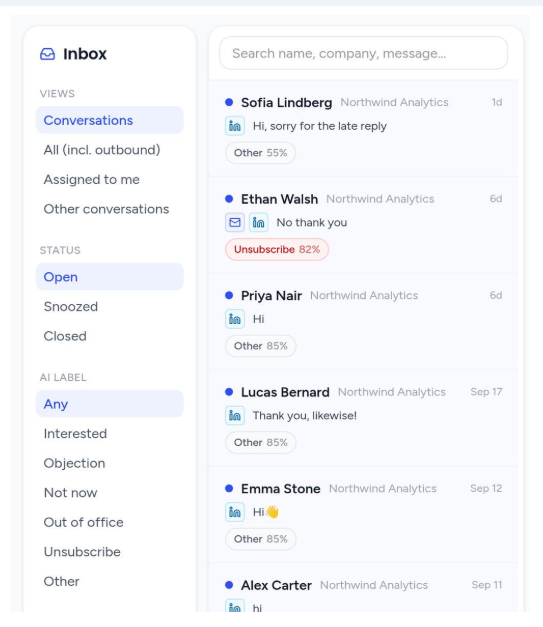
  • ✓ Filter by any of the six labels, or by channel
  • ✓ Assign a conversation to a teammate and tag the outcome
  • ✓ Snooze for a day, three days or a week, with a reminder
Salesflow Ariel unified inbox with AI label and channel filters and an Unsubscribe 82% reply chip
The inbox with its AI label and channel filters. Demo workspace with sample data.
Review · Drafted reply
Maya Lin · Head of Sales
Brightline Labs · sample data
Interested 81%
Interesting, but we're a team of two and can't spend anything until next year.
Thanks Maya, that makes sense. Would a short call in January help you plan for next year?
Check before sending: "January" is not confirmed in the thread.
05 · HUMAN IN THE LOOP

Ariel sorts the replies. Your reps make the call.

A label is not a verdict. "Interesting, but no budget until next year" is correctly Interested and still needs a person to judge it. Ariel can draft the answer from the thread and the contact's details, but nothing reaches a prospect until a human approves it.

✓

Approve, edit, regenerate with feedback, or reject

✓

Unverified details in a draft are flagged before you send

✓

Fix any label in one click, and your correction sticks

06 · COMPARE

Manual reply triage vs automated
lead qualification

Manual inbox triage

Data in one place, outreach in another

  • Every reply read in the order it arrived
  • Buyers sit below objections and auto-replies
  • Opt-outs rely on someone spotting them
  • Email, LinkedIn and SMS checked in different places
  • Hot replies wait until a rep reaches them

Ariel automated lead qualification

Enrichment and outreach in one AI SDR

  • Every reply labelled the moment it lands
  • Filter straight to Interested
  • Confident unsubscribes block future sends
  • One conversation per prospect, across channels
  • A team-wide alert on every Interested reply
The platform behind Ariel

What qualification takes off your desk

10,000+

users running their pipeline on Salesflow, across every industry

120+

countries running deals on Salesflow

6 labels

every inbound reply on email, SMS and LinkedIn is sorted into, on arrival

Getting Started
Getting started

Live on your first campaign

No scoring model to train. The labels are fixed and shared across every workspace. You choose what happens after them.

Step 1

Launch a campaign

Reply classification runs by default on every email, LinkedIn and SMS reply.

Step 2

Set the reply policy

Per campaign, stop the sequence on any reply, or on human replies only.

Step 3

Start each day on Interested

Answer buyers first, correct any label, and approve the drafted replies.

FAQ

Automated lead qualification questions

What is automated lead qualification?

Automated lead qualification uses software to decide which leads deserve a rep's time, without anyone sorting them by hand. Ariel does it on fit, intent and reply: it scores contacts against your ICP and buying signals, then labels every reply so reps answer interested prospects first.

Does automated lead qualification replace a rep reading replies?

No. It removes the sorting, not the judgement. Reps still read and answer the replies that matter, and nothing Ariel drafts is sent until a person approves it.

How fast is a reply classified?

Replies on email, LinkedIn and SMS are read automatically as they arrive. If a reply cannot be read within two minutes, it is labelled Other with a low confidence score, so a rep knows to check it.

Can I change what happens after a reply is classified?

Yes. Each campaign has a reply policy: stop the sequence on any reply, or only on a human reply so out-of-office messages are ignored. You can also change any label by hand, and a later read will not overwrite it.

Does an unsubscribe ever get missed?

An unsubscribe reply read at 80% confidence or higher blocks future sending automatically. Below that it is still labelled Unsubscribe for a person to confirm. Every send is also checked against your suppression list, which records unsubscribe clicks, hard bounces and do-not-contact entries.

Is this the same as lead scoring?

No. Lead scoring rates a contact before you reach out, on ICP fit and buying signals. Reply classification reads what the prospect wrote back. Ariel does both, so a perfect-fit prospect who says no is not treated as a hot lead.

Are interested leads assigned to a rep automatically?

No. An Interested reply moves the contact to the Replied stage and sends an alert to the whole workspace. Any teammate can then assign the conversation to an owner from the inbox.

How much does automated lead qualification cost?

Reply classification is part of Ariel, not a separate add-on. Book a demo and we will walk you through pricing for your team and volume.

More from Ariel
Keep reading

More from Ariel

See Ariel build pipeline on your market

Book a 30 minute demo and watch Ariel find buyers, write the outreach and line up meetings, with you approving every move.

Book a Demo See Ariel