Ariel feature · AI SDR for sales teams

An AI SDR for demand generation that reaches leads while they are warm

Connect the form tool, CRM or booking app that captures your leads. Ariel enriches each new lead, drafts follow-up that references what they asked for, and runs email and LinkedIn touches until they reply.

  • Started by a CRM event or an inbound webhook
  • Openers that reference what the lead downloaded or asked
  • A sequence that can stop the moment a lead replies
4.5 rating on G2
Speed to lead · Timeline
🔵
One lead, form fill to first reply Can stop the ladder once they answer
FF
Webhook fires Your form tool or CRM sends the lead
0 min
OK
Enriched and verified Email checked, details filled
Minutes
EM
First email drafted References what they downloaded, sent once approved
Same hour
IN
LinkedIn connection note If a profile is found
Day 1
Reply on day 2? With stop-on-reply on, no day 4 email chases someone who already answered.

Trusted by 10,000+ users across all sizes and industries

HubSpotClient logoClient logoClient logoClient logoClient logoClient logoClient logoClient logoClient logoClient logoClient logoClient logoClient logoHubSpotClient logoClient logoClient logoClient logoClient logoClient logoClient logoClient logoClient logoClient logoClient logoClient logoClient logo
01 · The problem

Leads cool while they wait in a queue

Demand gen is judged on leads, then on pipeline. The gap between the two is what happens in the hours after a form is submitted.

≡

Overnight queues

A lead that waits until tomorrow has often moved on.

⚠

Generic autoresponders

A template with a first name tells the lead nobody read the form.

↻

MQLs that never convert

The campaign report says generated. The pipeline meeting asks where they went.

02 · What Ariel does

What Ariel does for demand gen and marketing teams

Every lead you paid for gets fast, specific follow-up, without adding to your team's workload.

◎

Follow-up from the trigger

A new CRM record or an inbound webhook starts a play, with a 24-hour dedupe window and a 7-day cooldown per person.

✓

Personal, not templated

Openers reference what the lead did, checked against their real data before a person approves them.

✉

A multichannel ladder

Email and LinkedIn steps, plus call tasks for reps, paced over days rather than sent at once.

◆

Replies sorted on arrival

Six reply labels, with Interested replies moved to Replied and flagged to the workspace.

03 · How it works

How inbound lead follow-up works with Ariel

STEP 01

Lead lands

Your form tool or CRM sends the lead as a webhook or CRM event.

→
STEP 02

Enrich

The email is verified and missing details filled within minutes.

→
STEP 03

Follow up

Drafts wait for approval, then email and LinkedIn steps run on schedule.

→
STEP 04

Hand off

Replies are labelled, and call tasks carry the lead's context to a rep.

04 · Sequence builder

Build a follow-up ladder for each lead source

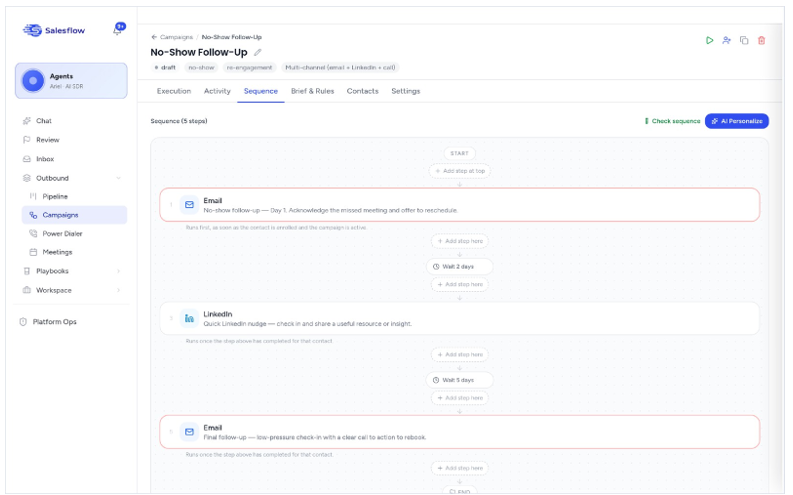
Each source can run its own sequence, tuned to what that form or page asked for. Wait and condition steps keep the pacing natural and branch on what the lead does.

✓

Wait steps in minutes, hours, days or weeks

✓

Branch on Replied, Opened or Connected on LinkedIn

✓

A missing personalisation field holds the send for review
See how the power dialer briefs every call →
Ariel · One inbox
Ariel follow-up sequence builder with email, LinkedIn and wait steps
A follow-up sequence with email, LinkedIn and wait steps. Demo workspace with sample data.
Follow up fast without burning your list
07 · Guardrails

Follow up fast without burning your list

Approval before send

Every AI-written message waits for a person, for every lead, not only the first batch.

Unsubscribes are permanent

An unsubscribe is suppressed across every campaign in the workspace.

No double hits

Dedupe windows, per-person cooldowns and a daily cap stop the same lead being chased twice.

06 · Compare

A marketing automation autoresponder vs Ariel

Autoresponder

  • Fast, but generic
  • The same template for every form
  • Email only
  • Replies land in a shared inbox, unsorted
  • Nothing for a rep to pick up

Ariel

  • Fast and specific
  • Openers written from what the lead did
  • Email, LinkedIn and call tasks in one ladder
  • Replies labelled, interested ones flagged
  • Call tasks briefed with the lead's context
Follow up fast without burning your list
07 · Guardrails

Follow up fast without burning your list

Approval before send

Every AI-written message waits for a person, for every lead, not only the first batch.

Unsubscribes are permanent

An unsubscribe is suppressed across every campaign in the workspace.

No double hits

Dedupe windows, per-person cooldowns and a daily cap stop the same lead being chased twice.

Why marketing teams run on Salesflow
The platform behind Ariel

Why marketing teams run on Salesflow

10,000+

users running outbound on Salesflow

6 labels

every reply is sorted into as it lands

★★★★★ G2

Rated 4.5 by users on G2

Getting Started
Getting started

Your first follow-up ladder, one source at a time

One lead source, one ladder, reviewed before it scales.

1

Connect your busiest source

Send its leads by webhook or CRM event before touching the rest.

2

Build the ladder

Use your own content references, not generic copy.

3

Check the first 50 leads

Compare the reply labels with what a person would call them, then add a second source.

FAQ

AI SDR for demand generation: questions before you buy

What is an AI SDR for demand generation?

It is an AI SDR that follows up the leads your campaigns already generate. Ariel enriches each new lead, drafts follow-up that references what they did, runs email and LinkedIn touches and sorts the replies, so fewer MQLs go cold before sales reaches them.

How fast does follow-up start?

Once your form tool or CRM sends the lead as a webhook or CRM event, enrichment and the first draft typically happen within minutes. The message sends after a person approves it, inside your sending window. A form on your website is not a trigger on its own.

Does Ariel replace lead scoring?

No. Your scoring model, MQL definition and attribution stay yours. Ariel classifies replies, scores contacts on fit and activity, and runs the follow-up.

What happens if a lead replies during the sequence?

You can set the campaign to stop on any reply, or on human replies only, so no further step chases someone who already answered.

Can different lead sources get different sequences?

Yes. Each source can run its own ladder, tuned to what that form or page asked for.

Does a lead ever get contacted after unsubscribing?

No. An unsubscribe is suppressed across every campaign in the workspace and checked before every send.

How much does Ariel cost?

Pricing depends on your lead volume and team. Book a demo and we will walk you through it.

More from Ariel
Keep reading

More from Ariel

See Ariel build pipeline on your market

Book a 30 minute demo and watch Ariel find buyers, write the outreach and line up meetings, with you approving every move.

Book a Demo See Ariel