A prospect receives your email on Monday, accepts your LinkedIn connection request on Wednesday and replies with interest on Thursday. On Friday, another automated email arrives asking whether they saw your first message.
Your team has just turned a promising conversation into an awkward one.
This happens when email, LinkedIn and phone outreach operate independently. Each channel follows its own schedule, but nobody has a complete view of the prospect's journey.
AI outbound sales brings these activities together. It helps sales teams find relevant buyers, verify contact information, prepare personalised messages, coordinate outreach and identify responses that deserve human attention.
The goal is not to contact as many people as possible. It is to create more meaningful conversations with the right buyers without damaging your sending reputation or overwhelming your sales team.
What Is AI Outbound Sales?
AI outbound sales is the use of artificial intelligence to support prospect discovery, contact verification, personalised messaging, multichannel outreach, follow-ups and reply management.
It combines automated sales development activities with human oversight, allowing representatives to spend less time preparing campaigns and more time speaking with potential customers.
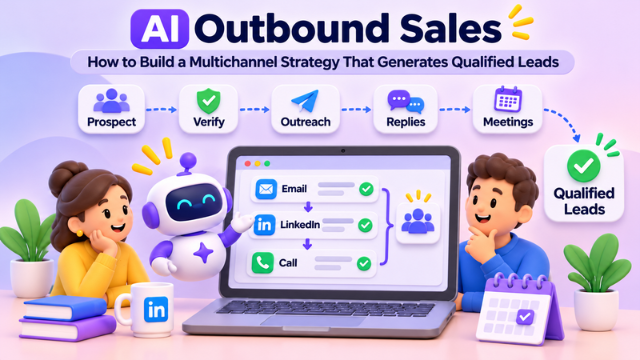
A well-structured AI outbound sales process connects five activities:
- Finding prospects who match your ideal customer profile.
- Discovering and verifying contact information.
- Preparing relevant, personalised outreach.
- Coordinating email, LinkedIn and phone activities.
- Identifying interested responses and qualified sales opportunities.
Unlike basic sales automation, which follows fixed templates and schedules, AI-assisted outreach can incorporate relevant prospect information, company developments and previous interactions when preparing messages.
However, AI cannot compensate for an unclear offer or a poorly targeted audience. Those decisions still belong to your sales team.
Why Single-Channel Outbound Sales Is Losing Effectiveness
Email remains an important sales channel, but relying on email alone limits how and when your business can reach potential buyers.
Prospects receive competing sales messages throughout the working week. Some rarely check unsolicited emails, while others actively use LinkedIn or prefer speaking directly with a representative.
The problem becomes more noticeable when sales teams respond to declining engagement by increasing email volume rather than improving relevance.
Adding more channels does not automatically improve results. A prospect who receives three disconnected sales messages may become less interested, not more.
The advantage of multichannel outbound sales comes from coordination. Every interaction should build on what happened previously.
What a Connected AI Outbound Sales Strategy Looks Like
Imagine a sales representative managing 300 prospects across an email platform, a LinkedIn account and a separate calling spreadsheet.
Keeping track of every interaction manually becomes difficult. Replies get missed, follow-ups arrive at inappropriate times, and prospects receive messages that ignore earlier conversations.
A connected outbound strategy avoids these problems by maintaining a shared view of each contact.
Three principles make this approach work.
One coordinated outreach sequence
Email and LinkedIn activities follow the same campaign schedule, while phone tasks are queued for representatives when appropriate.
Each interaction contributes to a wider conversation instead of operating as an independent campaign.
One shared contact status
The sales team can see whether a prospect has received an email, accepted a LinkedIn connection request, replied or moved towards a meeting.
This reduces duplicated outreach and gives representatives the context they need before contacting someone.
One clear stopping condition
When a prospect replies, scheduled follow-ups should stop so the team can decide what happens next.
Continuing an automated sequence after someone has responded creates confusion and undermines trust.
Salesflow's Ariel AI SDR supports this connected approach, bringing prospect research, outreach preparation, campaign execution and reply management into one workflow.
How to Build a Multichannel AI Outbound Sales Sequence
The strongest outbound sequences give buyers a reason to engage at every stage.
Consider an illustrative campaign targeting operations leaders at manufacturing companies that are expanding their sales teams.
Instead of introducing your entire product offering in the first message, focus on one relevant business challenge and develop the conversation over several days.
The schedule is an example, not a universal formula for every audience.
What matters most is that the steps remain connected. If the prospect replies on Day 3, the scheduled Day 5 email and Day 8 call task should stop.
A meaningful reply deserves a conversation, not another automated follow-up.
Give every touchpoint a purpose
A four-step sequence should not contain four versions of the same sales pitch.
Your opening email introduces the reason for contacting the prospect. A LinkedIn interaction provides another appropriate opportunity to establish a professional connection. The follow-up email introduces new information, while a phone call allows a representative to discuss requirements directly.
This is where AI outbound sales becomes useful: it helps organise these activities without requiring representatives to track every campaign step manually.
How to Use Email, LinkedIn and Phone Together
Each outreach channel serves a different purpose. Using them effectively requires understanding what makes a prospect more likely to welcome the interaction and what makes them disengage.
Cold email: Start with a relevant business problem
Email is often the first step in an outbound sequence because buyers can read and respond when convenient.
An effective opening email should establish why you are contacting that particular person.
For example, suppose your company provides sales development software and your prospect is expanding their sales team.
A generic message might read:
Hi Alex,
We help businesses generate more leads and grow revenue through AI sales automation. Would you be interested in a quick demo?
The message describes your product but gives Alex little reason to respond.
A more relevant approach would be:
Subject: Pipeline for your growing sales team
Hi Alex,
I noticed you're recruiting additional account executives.
When sales teams expand, generating enough qualified opportunities for new representatives can become a challenge.
Is building a more consistent outbound pipeline something your team is working on this quarter?
The second example opens a conversation around a potential business requirement rather than immediately asking the prospect to buy.
Before sending any campaign, check that your research is accurate, your contact information is verified and your message offers something relevant.
AI can help prepare the draft, but someone who understands your business should review it.
LinkedIn outreach: Continue the conversation without repeating it
LinkedIn gives sales teams another opportunity to engage with relevant decision-makers professionally.
The mistake is treating LinkedIn as a second inbox for the same cold email.
If your initial email discussed sales team expansion, a LinkedIn connection note could simply reference the same subject without repeating the entire pitch.
For example:
Hi Alex, I came across your team's recent sales hiring activity. I work with B2B teams on outbound pipeline development and thought it would be useful to connect.
The message is short, relevant and does not demand an immediate meeting.
Respect LinkedIn's platform policies and the recipient's preferences. Avoid repetitive invitations, excessive activity and unwanted follow-ups.
LinkedIn does not publish a universal connection invitation limit that guarantees account safety. No automation platform can promise that an account will never face restrictions.
Phone outreach: Give representatives context before they call
Phone calls work differently from automated email and LinkedIn steps.
A sales representative should have a legitimate reason to call, understand the prospect's business and know what previous outreach has taken place.
Consider this illustrative opening:
Hi Alex, this is James from Salesflow. I recently reached out about building outbound pipeline as your sales team expands. I wanted to understand whether prospecting capacity is something you're currently reviewing.
The opening explains who is calling and why. It also gives the prospect an opportunity to indicate whether the subject is relevant.
Salesflow's Power Dialer supports representative-led calling by organising call queues and checking suppression, do-not-call status and local calling windows before dialling.
Your team remains responsible for establishing the applicable permission or legal basis for contacting prospects.
The Infrastructure Behind Effective Outbound Sales Automation
Good outreach depends on more than well-written messages.
If your contact database contains outdated information, your email accounts have poor sending reputations or your opt-out records are incomplete, adding AI will not solve the underlying problems.
Four areas deserve particular attention.
Verified prospect information
Old email addresses and incomplete contact records lead to wasted outreach.
Using contact data enrichment helps sales teams find missing work emails, phone numbers and LinkedIn profiles before launching campaigns.
Ariel uses multiple data sources and verifies newly discovered email addresses before charging for them. Existing contact information does not need to be purchased again unnecessarily.
Multi-inbox sending
Sales teams managing several outbound campaigns need visibility into sending volume and mailbox health.
Multi-inbox sending allows campaigns to use a pool of sending accounts with individual limits and health controls.
This helps manage workload across connected inboxes. It should not be used to bypass email provider restrictions or continue sending unwanted messages.
Gradual email warm-up
New sending accounts require careful management before handling regular outbound activity.
Check email authentication, monitor delivery performance and introduce legitimate sending activity gradually.
Increasing volume before identifying delivery problems can make those problems more expensive to resolve.
Consistent suppression and opt-out management
A prospect who has unsubscribed from your emails should not receive another message simply because someone uploads a new contact list.
Suppression records need to remain consistent across campaigns and imports.
Ariel checks suppression before sends and dials, helping prevent blocked contacts from being contacted again through a new campaign.
Six Guardrails Every AI Outbound Sales Campaign Needs
Outbound sales automation should include clear operating rules that protect prospects, sales accounts and business reputation.
Ariel's Power Dialer uses a built-in weekday calling window of 9 a.m. to 6 p.m. in the prospect's local time. Your organisation may need to follow additional restrictions depending on its market and applicable regulations.
These controls support responsible outreach, but software cannot guarantee legal compliance or account safety.
Sales leaders should know which rules their platform enforces and which responsibilities remain with their team.
How to Measure AI Outbound Sales Performance
Sales activity is easy to count. Business value is harder to measure.
An outbound campaign may generate thousands of email sends, hundreds of LinkedIn interactions and numerous phone calls without producing enough qualified sales opportunities.
Measuring each channel separately also creates an incomplete picture.
A prospect might first discover your offer through email, accept a LinkedIn connection request and finally book a meeting during a phone call. Giving all the credit to the last interaction overlooks the contribution of the earlier touchpoints.
Track the sequence as a whole.
A practical example of campaign performance
Consider an illustrative outbound campaign with the following results:
These figures are hypothetical and do not represent guaranteed or actual Salesflow results.
They demonstrate why meetings and acquisition costs provide more useful insights than message volume alone.
If the positive reply rate is low, review your audience and offer before increasing campaign activity.
If meetings are being booked but prospects rarely attend, examine your qualification process and meeting expectations.
If complaints or blocked steps increase, investigate the cause before continuing.
A 30-Day Plan for Launching Your AI Outbound Sales Campaign
One of the most expensive mistakes in outbound sales is introducing every channel at full volume before understanding how the market responds.
A gradual rollout allows your team to test its messaging, confirm operational safeguards and identify problems before expanding the campaign.
The following 30-day plan is an illustrative starting point. Adjust it according to your account health, audience permissions, market requirements and available sales resources.
Days 1 to 5: Start with email
Begin with a carefully selected segment of 50 to 100 relevant, verified contacts.
Define one audience, one business problem and one clear outreach offer.
Review every initial message and monitor contact quality, delivery performance, replies and opt-outs.
Avoid introducing LinkedIn or phone activity until you have assessed the first campaign.
Days 6 to 12: Introduce LinkedIn outreach
Add an appropriate LinkedIn step for the same audience where platform policies and recipient preferences allow it.
Keep the message connected to the original email rather than introducing an unrelated product pitch.
Monitor responses, connection acceptance and any account warnings. Review unexpected changes before expanding activity.
Days 13 to 20: Add representative-led calls
Introduce phone calls for suitable prospects who have shown relevant engagement but have not responded directly, provided calling them is permitted.
Start with a small queue, such as fewer than 20 calls per day, and review call outcomes manually.
Representatives should understand the previous outreach history before starting each conversation.
Days 21 to 25: Expand the audience if results support it
If the initial campaign demonstrates relevant engagement and healthy sending performance, consider expanding the target segment towards 300 to 500 contacts.
Maintain the channel limits and operating safeguards that your team has already validated.
Do not increase audience size, sending frequency and channel activity simultaneously. That makes it difficult to identify the cause of any performance change.
Days 26 to 30: Review and decide what comes next
Assess the full campaign using positive replies, qualified meetings, delivery performance, complaints and acquisition costs.
Identify which channel combinations contributed to useful conversations.
Only expand further if the results justify it.
A slower, measured launch gives your team more useful information than starting with a large campaign and trying to diagnose problems afterwards.
Where Human Judgment Still Matters in AI Sales Outreach
AI outbound sales can reduce repetitive work, but removing people from every stage of sales development creates unnecessary risks.
There are several situations where human involvement is particularly important.
When a prospect asks a meaningful question
A buyer asking how your product fits their team is showing more than basic engagement.
They deserve an informed response that considers their requirements rather than a generic automated answer.
When targeting complex or high-value accounts
Large organisations often have multiple decision-makers with different priorities.
A message intended for an operations manager may not address the concerns of a finance director or chief executive. Representatives should review account-specific messaging before it goes out.
When campaign performance changes unexpectedly
A sudden increase in email bounces, complaints or skipped activities deserves immediate attention.
Pause the affected campaign, investigate what changed and correct the problem before resuming.
When reviewing AI-generated messages
AI may misunderstand a company's announcement, draw an incorrect conclusion or describe a product capability inaccurately.
Human review protects your brand and ensures that your outreach reflects what your business actually offers.
With Ariel, your team reviews AI-written messages before they are sent.
How Salesflow's Ariel Connects AI Outbound Sales
Running an outbound campaign often means switching between prospect databases, email tools, LinkedIn accounts, calling systems and spreadsheets.
Ariel, Salesflow's AI SDR, brings these activities into a connected workflow so your team can manage prospecting and outreach with greater visibility.
Ariel classifies inbound responses using six reply labels, helping your sales team distinguish interested buyers from objections, out-of-office messages and other responses.
Email and LinkedIn run as a coordinated automated sequence, while phone outreach operates alongside it through the Power Dialer.
The objective is not to remove representatives from the sales process. It is to reduce the repetitive work surrounding each conversation so they can concentrate on the buyers who deserve their attention.
Build a Pipeline That Prioritises Conversations Over Volume
A full outreach schedule does not necessarily mean a healthy sales pipeline.
What matters is whether your campaigns reach relevant buyers, create meaningful conversations and generate qualified opportunities at a sustainable cost.
Start with a clearly defined audience. Build a relevant message. Connect your outreach channels, respect prospect preferences and review performance before expanding.
AI makes much of this work easier to manage, but the quality of your targeting, offer and conversations still determines what happens next.
With Salesflow's Ariel, your team can bring prospect discovery, contact enrichment, email, LinkedIn, representative-led calling and reply management together without losing control of what is communicated in your company's name.
Frequently Asked Questions
What is AI outbound sales?
AI outbound sales uses artificial intelligence to support prospect discovery, contact verification, personalised outreach, follow-ups and reply management. It helps sales teams organise outbound campaigns while keeping people responsible for sales decisions and buyer conversations.
Is multichannel outbound sales just email with LinkedIn added?
No. A connected multichannel outbound strategy coordinates outreach timing, contact history, response handling and stopping conditions. Each channel contributes to the same conversation rather than operating as an independent campaign.
How many LinkedIn connection invitations can I safely send each week?
There is no universal number that guarantees account safety. LinkedIn's restrictions may vary, and users should follow its current platform policies. Monitor account warnings and avoid excessive or unwanted activity.
Can outbound phone calls be flagged as spam?
Yes. Unwanted calls, inappropriate calling times and failure to respect contact restrictions can lead to complaints. Ariel's Power Dialer supports suppression, do-not-call and calling-hour checks, while your team remains responsible for applicable permissions and legal requirements.
How long should I wait between outbound sequence steps?
A gap of two to three days can provide a useful starting point, depending on the audience and previous interaction. Adjust timing based on prospect responses, channel requirements and campaign performance.
What happens when a prospect unsubscribes during a campaign?
An unsubscribe should stop applicable future outreach. Ariel checks suppression records before sends and dials, helping prevent blocked contacts from being reintroduced through another campaign or contact import.
Does Ariel automate email, LinkedIn and phone outreach?
Ariel runs email and LinkedIn outreach within a coordinated sequence. Phone tasks are queued through the Power Dialer for representatives to place, while AI-written messages require human approval before sending.
How can I use AI outbound sales to generate more qualified leads?
Start by defining your ideal customer profile, verifying prospect information and creating messages around relevant business requirements. Coordinate outreach channels, prioritise interested replies and measure qualified meetings rather than simply counting messages sent.