Ariel use case · AI ABM

AI ABM that reaches the whole buying committee

Ariel, Salesflow's AI SDR, builds your target account list, finds the decision makers inside each account and writes role-based outreach for every one of them. Your team approves each message before it sends.

  • Target accounts from named lists, lookalikes, intent and site visits
  • Decision makers found and verified at every account
  • Nothing sends until someone on your team approves it

4.5 rating on G2
Target account · Buying committee
M
Meridian Logistics Logistics · 400 employees · sample data
Hot · 82
Watchlist signal: hiring burst, 6 sales roles posted this week
Sales Manager Champion · email verified
Week 1 · Approved
RevOps Lead Technical evaluator · email verified
Week 1 · In review
VP Sales Economic buyer · email verified
Week 3 · Queued
Account Executive Influencer · LinkedIn profile found
LinkedIn only
One account, one timeline. Four roles, four messages, staggered so the account sees one conversation.

Trusted by 10,000+ users across all sizes and industries

HubSpotClient logoClient logoClient logoClient logoClient logoClient logoClient logoClient logoClient logoClient logoClient logoClient logoClient logoHubSpotClient logoClient logoClient logoClient logoClient logoClient logoClient logoClient logoClient logoClient logoClient logoClient logoClient logo
01 · WHY AI ABM

AI account-based marketing built for outbound, not just ads

Larger deals are decided by a group, not one inbox. Ariel works each account as a unit, so the right people hear the right message at the right time.

Accounts, not contacts

Every contact inherits the account's signal and score, so outreach starts from why the company matters now.

The whole committee

Ariel finds several decision makers per account, not one name per company, and verifies their emails.

Written for each role

Each message is drafted from that person's title, company and the account signal, not a shared template.

Human approved

Every AI-written message waits in the review queue until someone on your team approves it.

02 · HOW IT WORKS

How Ariel runs an ABM play, from
account list to meeting

One workflow instead of a spreadsheet, a data tool and a separate sequencer.

STEP 01

Pick accounts

Name your target accounts, or let Ariel find them from lookalikes, intent topics and website visits.

STEP 02

Map the committee

Ariel finds decision makers at each account by title and verifies their contact details.

STEP 03

Write by role

Each message is drafted for one person from their role, company data and the account's signal.

STEP 04

Approve and launch

You approve each draft. Email and LinkedIn steps run, call tasks go to your reps, and meetings are tracked to the campaign.

03 · TARGET ACCOUNTS

Build a target account list from real buying signals

Start from the accounts you already want, or let Ariel surface the ones showing interest right now.

✓

Watchlists check named accounts every six hours for funding, leadership changes and hiring

✓

Lookalike search finds companies like your best customers from one domain

✓

Intent Radar flags accounts researching your topics

✓

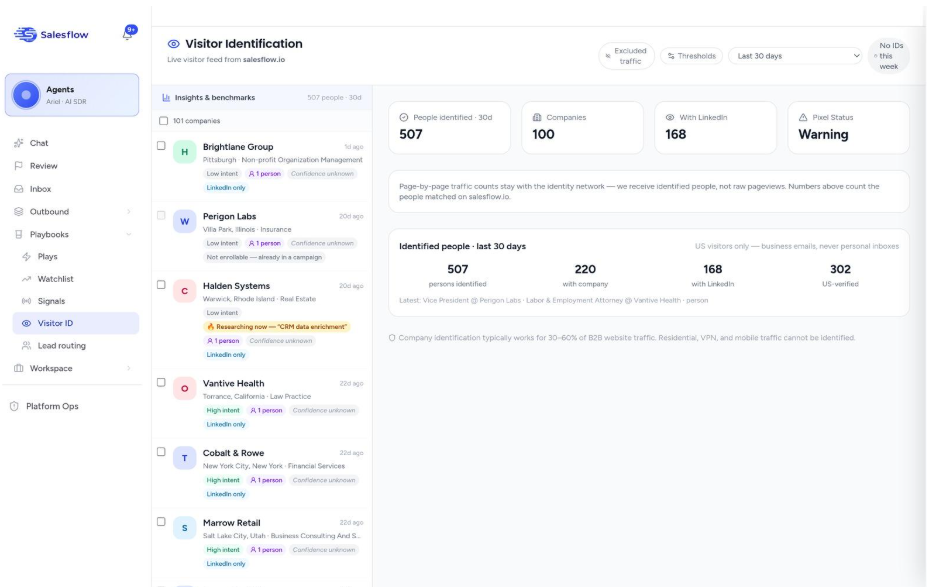
Visitor ID turns companies on your website into named accounts

✓

A living score from 0 to 100 blends fit and recent activity
See how Intent Radar finds in-market accounts →
Visitor Identification Dashboard

Visitor ID lists the companies researching you, ready to add to an account list. Demo workspace with sample data.

04 · THE BUYING COMMITTEE

Find and verify the buying committee
at every account

One contact per account is one opinion in a room of several. Ariel finds the people behind each role, and every message speaks to what that role cares about.

Economic buyer

VP Sales

Leads with pipeline impact and cost per meeting.

Champion

Sales manager

Leads with time saved for the team. Often the first to reply.

Technical evaluator

RevOps lead

Leads with data quality, verification and controls.

Influencer

Account executive

A lighter LinkedIn touch, not a full sequence.

Blocker

IT or security

Not contacted cold. Their questions are answered in the evaluator's materials.

✔

Choose the titles, and how many people to find per account

✔

Lookalike search confirms each person works at the company

✔

Emails verified before use, duplicates merged, not re-added

05 · MULTI-THREADED OUTREACH

Multi-threaded outreach that reads
as one campaign, not five

Five identical sequences to five people at one company is noise. Stagger by role so the account sees one coordinated conversation.

Sequencing · One timeline
1

Champion

References the account's own signal

Week 1
2

Technical evaluator

Leads with verification and controls

Week 1
3

Economic buyer

Once someone at the account has engaged

Week 3
4

Blocker

Concerns folded into the evaluator's materials

Ongoing
salesflow.ai/sequences/no-show-follow-up
Email No-show follow-up – Day 1. Acknowledge the missed meeting and offer to reschedule.
in
LinkedIn Connection request – Share a quick value thought or resource link.
📞
Call Task Power Dialer Queue – Quick follow-up on sent email materials.

Email, LinkedIn and wait steps in one editable sequence. Demo workspace with sample data.

✔

Each message uses that person's title, company and the account's why-now signal

✔

Email and LinkedIn in one sequence, with branches for replied, opened and connected

✔

Call tasks put engaged contacts in your reps' Power Dialer queue

✔

You set the order by role with separate, timed campaigns

06 · YOU STAY IN CONTROL

Every message approved before it reaches a target account

In ABM, one careless message can cost you the account. Ariel drafts the work. Your team decides what goes out.

✓

Approve, edit, regenerate or reject every AI-written draft

✓

Drafts are checked against your writing rules before review

✓

Customers and live deals stay off-limits with a workspace blacklist

✓

Lead routing assigns new accounts to the right rep

Review queue
3 waiting
Email · Week 1 · Meridian Logistics · sample data
To: Sales Manager, champion

Subject: Ramping six new reps at Meridian

Saw Meridian is hiring six sales roles this quarter. Teams growing that fast usually lose the first month to list building and admin…

✓ Writing rules passed ✓ Not suppressed ✓ No duplicate enrolment
07 · COMPARE

AI ABM in an AI SDR vs a
traditional ABM platform

Traditional ABM platform

Built for marketing and advertising

  • Account insight in one tool, outreach in another
  • Buying-group data exported to a sequencer
  • Often a multi-week implementation
  • One message per segment or persona
  • Separate logins, contracts and data to reconcile

Ariel AI ABM

Built to start conversations at target accounts

  • Account list, committee and outreach in one AI SDR
  • Contacts go straight into email and LinkedIn steps
  • No implementation project, first play this week
  • A message written for each person's role
  • Every message approved by your team
Platform Behind Your ABM Program
Proof

The platform behind
your ABM program

10,000+

Users running outbound on Salesflow

120+

Countries where teams run deals on Salesflow

★★★★★ 4.5 on G2

Rated 4.5 by users on G2

Getting Started
Getting Started

Run your first AI ABM play this week

No implementation project. A short account list, a mapped committee, and drafts ready for review.

Step 1

Name your accounts

Add target accounts, or describe your ideal customer and let Ariel find them.

Step 2

Map the committee

Ariel finds and verifies decision makers by role at each account.

Step 3

Approve and launch

Review the drafts, set the order by role, and start the conversation.

FAQ

AI ABM questions

What is AI ABM?

AI ABM is account-based marketing where AI does the research and legwork: building the target account list, finding the buying committee, verifying contact details and drafting outreach for each role. In Ariel, your team still approves every message before it sends.

How does Ariel build a target account list?

From named accounts you add to a Watchlist, lookalikes of your best customers, accounts researching your topics in Intent Radar, or companies visiting your website through Visitor ID. Each account carries a living score, so you can work the hottest first.

How many people in a buying committee should you contact?

Most B2B buying committees have four or five roles worth reaching. Smaller companies compress that to two or three, and enterprise accounts can run wider. In Ariel you choose the titles and how many people to find per account.

Should everyone at the account get the same message?

No. Each role has a different stake in the decision, so the message changes while the reason for reaching out, usually a shared account signal, stays the same.

Does AI ABM work without intent data?

Yes. A named account list or an ideal customer profile search does not need a signal to start. When a real signal appears, such as a funding round or a hiring burst, it gives every message a stronger opening line.

Can Ariel find the buying committee automatically?

Ariel finds likely decision makers at each account by job title and checks that they work there. Who has the final say still benefits from your rep's read on the account, so you assign the roles and the order.

Will Ariel send anything without approval?

No. Every AI-written message waits in the review queue until someone on your team approves, edits or rejects it. Approved messages send within the campaign's sending window.

How much does AI ABM software cost?

AI ABM is part of Ariel, and pricing depends on your team and volume. Book a demo and we will walk you through it.

More from Ariel
Keep reading

More from Ariel

See Ariel build pipeline on your market

Book a 30 minute demo and watch Ariel find buyers, write the outreach and line up meetings, with you approving every move.

Book a Demo See Ariel