Ariel feature · AI SDR for RevOps

An AI SDR for RevOps that reads your CRM and never writes over it

Ariel reads contact lists from your CRM, dedupes and verifies them on the way in, and enforces suppression before every send and dial. Nothing is written back to your system of record, so there is no field to fight over.

  • Read-only CRM import, with lists re-read nightly
  • Duplicates matched by email or LinkedIn URL and merged
  • Every send, approval and suppression logged on the contact
4.5 rating on G2
CRM read · This week

What Ariel reads, and what it never touches

Every read documented, every suppression enforced

✓
Contact list 25-row preview, columns auto matched
Read only
↻
Synced list Re-read every night, folded into the same list
Nightly
⦸
Suppressed contact Blocked at send and at dial, whatever list it arrives on
Always blocked
◈
Open deal size Mirrored nightly for HubSpot and Pipedrive
Nightly
Nothing writes back. Ariel reads your CRM. It never writes a field, an activity or a stage change into it.

Trusted by 10,000+ users across all sizes and industries

HubSpotClient logoClient logoClient logoClient logoClient logoClient logoClient logoClient logoClient logoClient logoClient logoClient logoClient logoHubSpotClient logoClient logoClient logoClient logoClient logoClient logoClient logoClient logoClient logoClient logoClient logoClient logoClient logo
01 · THE PROBLEM

Your reps are short of selling hours, not targets

Most of a rep's week goes on prospecting work nobody hired them for. None of it shows on a scoreboard, but it eats the time that should go on the next conversation.

Lists built by hand

Hours a week copying prospects out of spreadsheets and LinkedIn tabs.

!

Guessing what bounces

Emails checked one at a time, and a sending domain still takes the hit.

↶

Follow-ups that slip

Replies spread across inboxes, and the fourth touch that never gets sent.

02 · What Ariel does

What Ariel gives revenue operations

Clean data in, enforced rules on the way out, and a record of everything in between.

◎

Read-only import

Lists come in from your CRM or sheets with a 25-row preview and auto-matched columns. Nothing is written back.

✓

Dedupe on the way in

Every import is matched against existing contacts by email or LinkedIn URL and merged, not duplicated.

✉

Verified before it is billed

Only a newly found email or phone number is charged, each email is verified first, and fields are not re-fetched within 30 days.

◆

Suppression that holds

Unsubscribes, hard bounces and do-not-contact entries are checked before every send and every dial.

03 · How it works

How Ariel handles your data, step by step

STEP 01

Import

Pick a CRM list, preview 25 rows and confirm the column match.

→
STEP 02

Dedupe

Rows matching an existing contact by email or LinkedIn URL fill its blanks instead of creating a copy.

→
STEP 03

Enrich and verify

Missing details are found in a waterfall. Invalid emails are discarded at no cost.

→
STEP 04

Gate every send

A pre-send check runs suppression, blacklist and do-not-call before anything goes out.

04 · Controls

Decide what Ariel may do, and see who changed it

Admins control which actions Ariel can take across the workspace. Changes take effect immediately and are recorded with who made them.

✓

Action switches are admin-only

✓

Protective actions, such as pausing a campaign, are never blocked

✓

Every approval, rejection and setting change in an audit trail
See how the power dialer briefs every call →
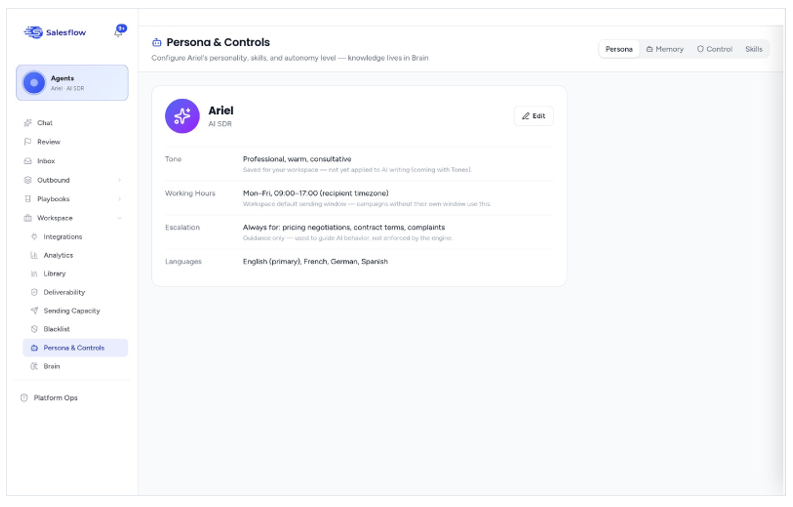
Ariel · One inbox
Ariel workspace persona and admin controls
Persona and controls. Demo workspace with sample data.
05 · CRM read behaviour

What Ariel reads from your CRM, and how often

One direction only. The mirror adds and updates rows, it never deletes, so a row removed in your CRM stays until you re-import into a fresh list.

WHAT HAPPENS HOW IT WORKS WHEN
Import a list 25-row live preview with columns auto matched before you commit Once, on demand
Dedupe Matched by email or LinkedIn URL and merged into the existing record Every import
Keep a list synced The same remote list is re-read and new rows folded in Nightly, up to 25 lists
Deal visibility Open deal size mirrored onto the account view for HubSpot and Pipedrive Nightly
Write back to your CRM No write path exists for fields, activities or stages Never
06 · Compare

A bolt-on sequencer vs Ariel

Bolt-on sequencer

  • Exports a list and loses track of it
  • Duplicates created on every import
  • Opt-outs live in another system
  • Credits spent on data you already hold
  • No record of who approved what

Ariel

  • Reads your CRM, never writes over it
  • Dedupes by email or LinkedIn URL on the way in
  • Suppression checked before every send and dial
  • Charged only for new, verified details
  • Approvals and sends logged on the contact
Built so reps trust what goes out in their name
07 · Guardrails

Controls a security review will ask about

Three fixed roles

Owner, Admin and Member, with every contact, campaign and credit isolated to its workspace.

Spend permissions

Admins decide which members can spend shared credits on revealing contact details.

in

Export and deletion

Owners can export all workspace data or delete the workspace, with a verified erasure receipt.

Why sales teams run on Salesflow
The platform behind Ariel

What RevOps gets back

10,000+

users running outbound on Salesflow

800+

connectable apps across 18 categories

30 days

freshness window before a field is re-fetched and charged again

Getting Started
Getting started

Turn on a sync without breaking reporting

One list first, not a rip and replace of your stack.

1

Start with one list

Turn on nightly sync for one remote list and watch it for a week.

2

Check duplicates and suppression

Confirm nobody is imported twice and a suppressed contact stays blocked.

3

Widen once it holds

Add more lists, within the 25 synced lists refreshed each night.

FAQ

AI SDR for RevOps: questions before you buy

What is an AI SDR for RevOps?

It is an AI SDR judged by how it treats your data: what it reads, what it checks and what it can never change. Ariel reads CRM lists one way, dedupes and verifies contacts on import, and enforces suppression before every send, so outbound scales without a clean-up project.

Does Ariel write to our CRM?

No. Ariel reads contact lists from your CRM and can re-read a list every night. It does not write fields, activities or stage changes back, so there is no sync conflict to manage.

Where can Ariel import contacts from?

Connected apps such as HubSpot, Pipedrive and Google Sheets, plus CSV upload, Sales Navigator and Ariel's own prospect search. The integrations catalogue lists 800+ apps across 18 categories, each with a live connection health check.

Can a suppressed contact come back through an import?

It can arrive in a new list, but it cannot re-enter a campaign. Suppression is checked at every send and every dial, and a blocked contact is named in an exclusion summary rather than dropped silently.

How are duplicates handled?

On import, a row matching an existing contact by email or LinkedIn URL fills that record's blanks instead of creating a new one. For older duplicates, the Duplicates panel groups likely matches and keeps the fullest record when you merge, with undo while the panel is open.

How do we audit what Ariel has done?

Sends, approvals and suppression events are logged against the contact, and setting changes and approvals are kept in an audit trail. Analytics views export to CSV exactly as shown on screen.

How is enrichment billed?

Credits are used only for a newly found email or phone number. LinkedIn URLs and job titles are free, and emails are verified before they are charged. For Ariel pricing for your team, book a demo.

More from Ariel
Keep reading

More from Ariel

See Ariel build pipeline on your market

Book a 30 minute demo and watch Ariel find buyers, write the outreach and line up meetings, with you approving every move.

Book a Demo See Ariel