.png)
Prefer listening?
Hear the audio version of this article here:
Most outbound sequences are linear by default.
In theory, that makes sense.
Step 1: Send a connection request.
Step 2: Wait three days.
Step 3: Send a follow-up.
Step 4: Send another message.
Simple. Predictable. Automated.
But reality rarely follows a script.
- What happens when someone doesn’t accept your request immediately?
- What if they never connect at all?
- What if some prospects only have an email available, and others don’t?
- What if someone opens your email but doesn’t reply? Or never opens it in the first place?
Despite this, many teams continue to push every contact through the same predefined steps, regardless of what actually happens.
The workaround is usually more structure, instead of better structure: one campaign for connected prospects. Another for cold email. Another for open profiles. And soon, you’re managing parallel flows just to handle basic variations in contact status.
The result? Campaign sprawl, manual handoffs, and timing gaps that reduce momentum.
Automation was supposed to create efficiency. Not repetition.
Your sequence can’t predict whether someone will accept your invite or open your email. But it can adapt to what happens next.
This is why dynamic outreach exists. In this article, we’ll break down how to build condition-based LinkedIn + email sequences using dynamic outreach, so your team can focus on building pipeline without getting buried in manual grunt work.
The Real Problem: Outbound Breaks When The Next Step Is The Wrong Step
Linear sequences don’t fail because they’re automated. They fail because they separate time from context.
In most traditional outreach flows, progression is driven by delays, not by what actually happened. A follow-up is triggered because three days passed, not because the contact connected. An email is sent because it’s “step four,” not because email is the most appropriate available channel.
That creates friction in two ways.
First, it creates channel misalignment:
- You send follow-ups without factoring in people that never accepted your connection request
- You ignore email as an option even though it’s available.
- You miss the opportunity to react when someone opens but doesn’t reply.
Second, it creates operational complexity behind the scenes.
To compensate, teams duplicate campaigns for different scenarios, connected vs not connected, email vs LinkedIn, open profile vs closed profile. What should be one system becomes multiple parallel tracks.
The problem isn’t a lack of automation. It’s that automation is running without conditional logic.
When the next step is determined by sequence order instead of contact state, execution becomes rigid. And rigidity at scale either leads to over-messaging or under-reacting, both of which reduce momentum.
Outbound works best when progression is triggered by reality, not just by a timer. And that is why dynamic outreach is the best way forward for most teams.
The Business Case For Dynamic Outreach: What Changes When Your Sequence Can Branch
When your sequence can branch based on conditions, the biggest shift isn’t cosmetic. It’s structural. You move from managing scenarios to managing logic.
Here’s what that changes in practice.
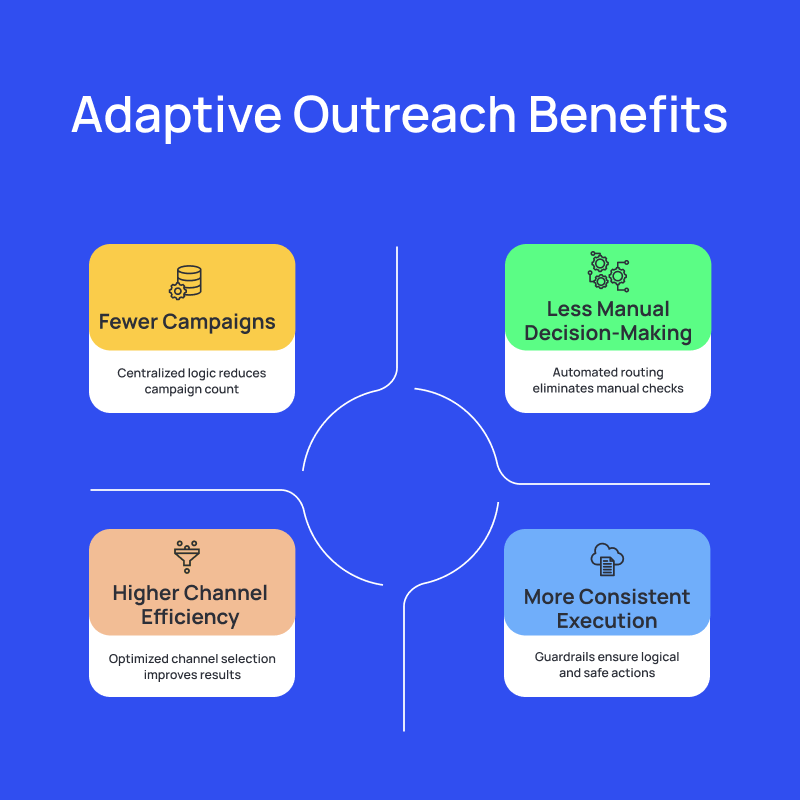
1. Fewer Campaigns to Manage
Without branching, each variation requires its own campaign.
One for connected prospects. One for cold connections. One for email-first outreach. Another for open profiles.
With adaptive logic, one campaign can handle those paths inside a single flow. Connected contacts move one way. Non-connected contacts move another. Email availability triggers its own branch.
Instead of duplicating infrastructure, you centralize it.
That reduces setup time, simplifies reporting, and makes iteration cleaner. When you improve the logic, you improve it in one place.
There’s also a measurable performance upside to combining channels intelligently. Multi-channel outreach has been shown to increase overall reply rates by 30-40% compared to single-channel outreach.
That lift doesn’t come from sending more messages. It comes from aligning the right channel with the right moment.
2. Less Manual Decision-Making
In linear systems, someone eventually has to check the status.
Did they connect? Did they open the email? Should we follow up here or switch channels?
Even small manual checks introduce friction. And at scale, friction compounds.
Branching removes that layer. The decision is predefined. The system evaluates the condition and routes the contact accordingly.
3. Higher Channel Efficiency
Not every contact should receive the same next action.
- If someone is already connected, a follow-up makes sense.
- If they’re not, a connection request does.
- If email is available, that might be the better path.
- If they opened but didn’t reply, that’s a different signal entirely.
Adaptive sequences align the next step with available context automatically.
That doesn’t guarantee higher reply rates. But it does ensure that your execution reflects reality.
4. More Consistent Execution
As flows become more complex, the risk of illogical or risky steps increases.
Sending follow-ups to non-connected prospects. Trying to send Open InMails where they aren’t allowed. Stacking actions that shouldn’t logically follow each other.
Condition-based systems introduce guardrails. Certain actions become available only when they make sense. Invalid paths are restricted. Failed actions are retried or safely skipped.
Ultimately, adaptive outreach isn’t about adding complexity to your sequence. It’s about removing unnecessary complexity from your operations.
Ready to move from duplicated campaigns to adaptive logic? Try Salesflow’s Dynamic Outreach today. Sign up for Salesflow’s 7-day free trial here.
How Does Dynamic Outreach Work?
In Salesflow, Dynamic Outreach is a campaign type that allows you to combine LinkedIn actions, email actions, waits, and conditional logic into a single structured flow.
Instead of building separate campaigns for every scenario, you define the logic once. Contacts then move through the sequence based on their individual status and behavior.
Each condition creates a YES / NO branch. The contact is evaluated against that condition and routed accordingly. From there, actions execute sequentially along that specific path.
This allows the sequence to react to real states, whether the contact is a 1st degree connection, whether Open InMail is available, whether an email exists, or whether an email was opened.
The next step is no longer just “what comes after three days.” It’s determined by context.
Actions You Can Combine
Dynamic Outreach supports both LinkedIn engagement actions and email actions within the same flow:
- Send Connection Request
- Send Follow-up (for connected contacts)
- Send Open InMail (when profile is open)
- Send Email (requires active email integration)
- Visit Profile
- Like Post
- Withdraw Invite
- Wait
These actions can be combined in different branches, with validation rules that prevent illogical steps (for example, you cannot send follow-ups to non-connected contacts, and Open InMail can only be added once per branch).
Every sequence automatically includes an End step, and pending invites are withdrawn automatically when a contact reaches the end of their path.
Conditions That Drive Branching
The core logic is driven by four supported conditions:
- If connected → Routes contacts based on 1st degree connection status
- If open profile → Determines whether Open InMail is available
- If email available → Checks for imported or LinkedIn email
- If email opened → Checks whether a previously sent email in that branch was opened
Each condition creates two paths: YES and NO. Contacts continue only within the branch that matches their status.
This allows you to structure flows like:
If connected → send follow-up
If not connected → send connection request
If email available → send email
If email opened → continue engagement
If not → route differently
The logic is explicit and visual inside the builder, as such:
Wait vs. Monitor: Understanding the Difference
Dynamic Outreach supports both Wait and Monitor, and they serve different purposes.
Wait:
- Pauses the sequence for a defined number of days.
- During this period, the system does not actively check conditions.
- When the wait ends, the next step executes based on the sequence logic.
Default wait is 1 day, and waits cannot be added back-to-back.
Monitor:
Available only for:
- If connected
- If email opened
Monitor continuously evaluates the condition during a defined period.
If the condition is met during that window, the contact is immediately routed to the YES branch.
If the monitoring period ends and the condition is still not met, the contact moves to the NO branch.
This is particularly useful when you want to give a contact time to accept a connection request or open an email before deciding the next step.
Follow-up timing matters more than most teams realize. Research consistently shows that structured follow-ups, rather than one-off sends, significantly increase response rates, and that’s exactly what conditional waits and monitoring enable.
If dynamic outreach sounds like just the thing your team needs to succeed, try Dynamic Outreach in Salesflow today, and create your first adaptive campaign. Sign up for Salesflow’s 7-day free trial now.
Practical Workflows That You Can Build Inside Salesflow
The value of condition-based outreach isn’t theoretical. It shows up in how you structure campaigns.
Here are small, practical use cases you can build using Dynamic Outreach inside Salesflow.
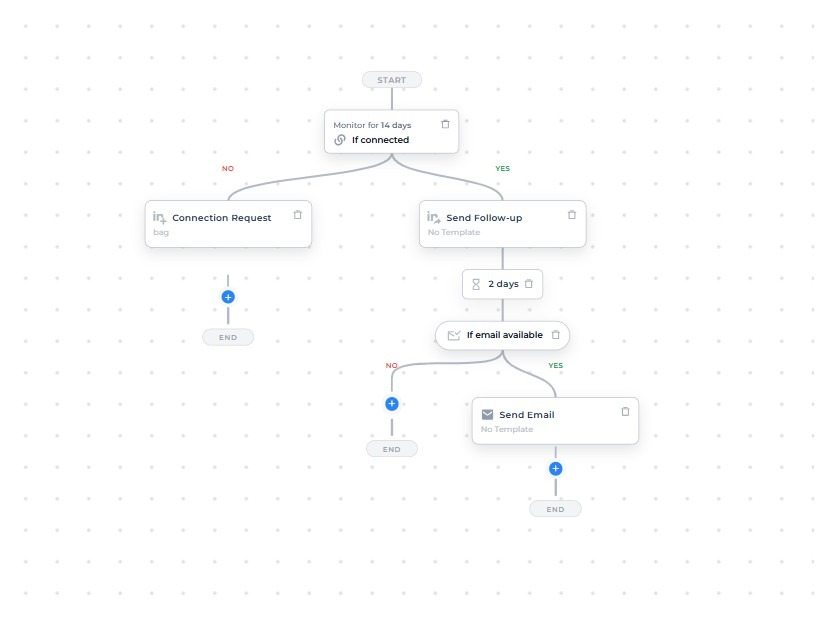
1. Connected vs. Not Connected
This is the most common branching use case.
Flow example:
If connected
→ Send Follow-up
→ Wait 2 days
→ Continue engagement
If not connected
→ Send Connection Request
Instead of running one campaign for connections and another for cold outreach, you manage both paths inside a single sequence.
The system automatically routes each contact based on connection status. No manual checks. No campaign duplication.
The final workflow might look something like:
2. Email Fallback When LinkedIn Isn’t Available
Not every prospect will connect. Some won’t allow Open InMails. Some simply respond better to email.
Dynamic Outreach allows you to structure fallback logic cleanly.
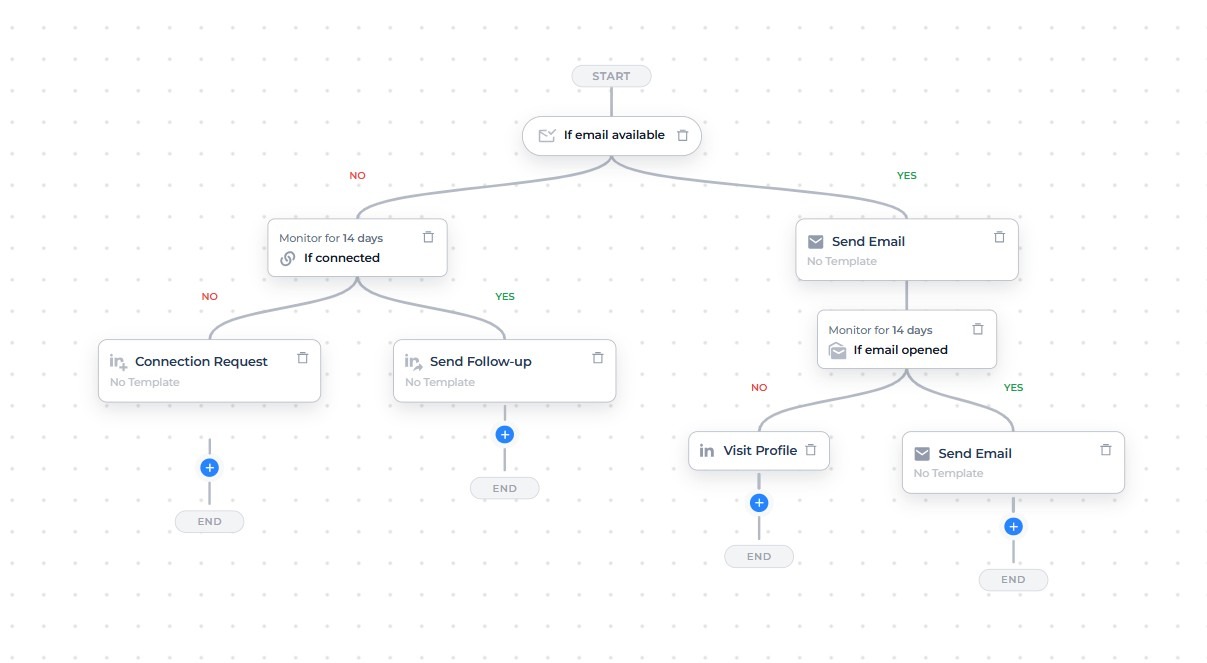
Flow example:
If email available
→ Send Email
→ Monitor “If email opened”
→ If opened → Send email
→ If not opened → Try LinkedIn action like visiting profile
If no email available and not connected on LinkedIn,
→ Send Connection Request
If no email available and connected on LinkedIn,
→ Send Follow-up
Salesflow automatically checks whether an email exists (imported or from LinkedIn) and routes the contact accordingly. If email integration is not connected, the campaign cannot start, preventing silent failure. This ensures the channel choice is based on availability, not assumption.
The final workflow might look something like:
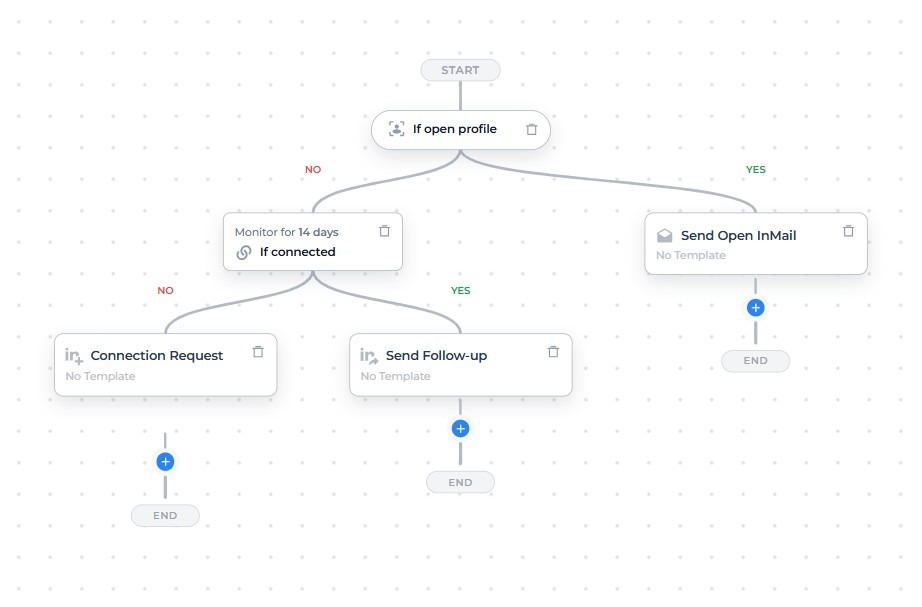
3. Open Profile Logic for Open InMail
Open InMail only works when a profile allows it.
Instead of manually filtering for Open Profiles, you can structure it directly into the flow.
Flow example:
If open profile
→ Send Open InMail
If not open profile
→ Send Connection Request
Salesflow automatically applies the “If open profile” condition when you add Open InMail. You can only send one Open InMail per branch, preventing overuse.
The final workflow might look something like:
Note: Open Profile detection is most reliable for Sales Navigator-based campaigns. For Basic Search, Open Profile status may be unavailable, and contacts can default to the NO branch.
4. Controlled Invite Hygiene with Automatic Withdrawal
Leaving connection requests pending for weeks isn’t ideal.
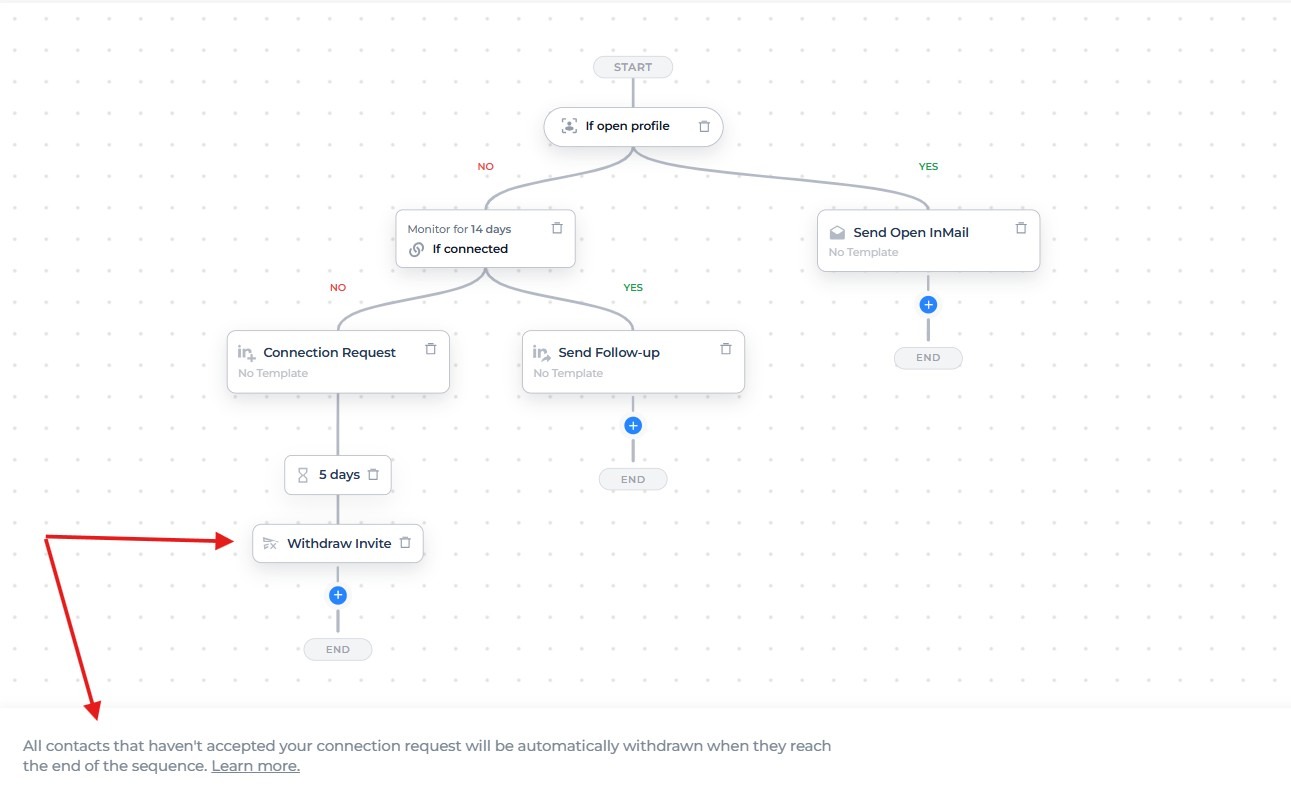
Every Dynamic Outreach sequence ends with an automatic End step. When a contact reaches it:
- Any pending invite is withdrawn automatically
- The withdrawal happens the same day the sequence ends for that contact
You can also explicitly add a Withdraw Invite step earlier in the flow if needed.
This keeps your LinkedIn activity cleaner without requiring manual invite management.
You can see both examples below:
5. Engagement Layering (Without Breaking Logic)
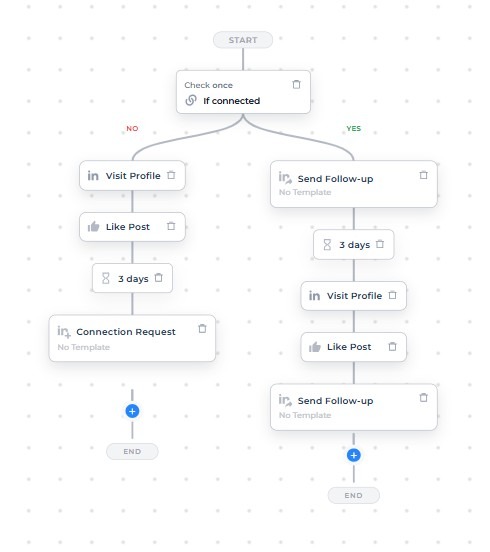
You can incorporate lighter-touch engagement actions into the flow:
→ Profile Visit
→ Like Post
→ Wait
→ Message
Example workflow with these engagement layers:
If limits are reached, Salesflow either skips safely or delays according to your configuration, and logs the action clearly.
Because Dynamic Outreach enforces validation rules (for example, preventing follow-ups to non-connected contacts), you avoid structurally invalid sequences while still layering engagement.
The key difference isn’t just that these actions exist.
It’s that they can coexist inside a single, condition-driven campaign, where connection status, email availability, and engagement determine progression automatically.
Note: Dynamic Outreach sequences are structured flows. Once a campaign is running, new contacts cannot be added mid-sequence. This ensures that every contact enters the flow from the beginning and moves through the defined logic consistently.
Smart Safeguards Built-In
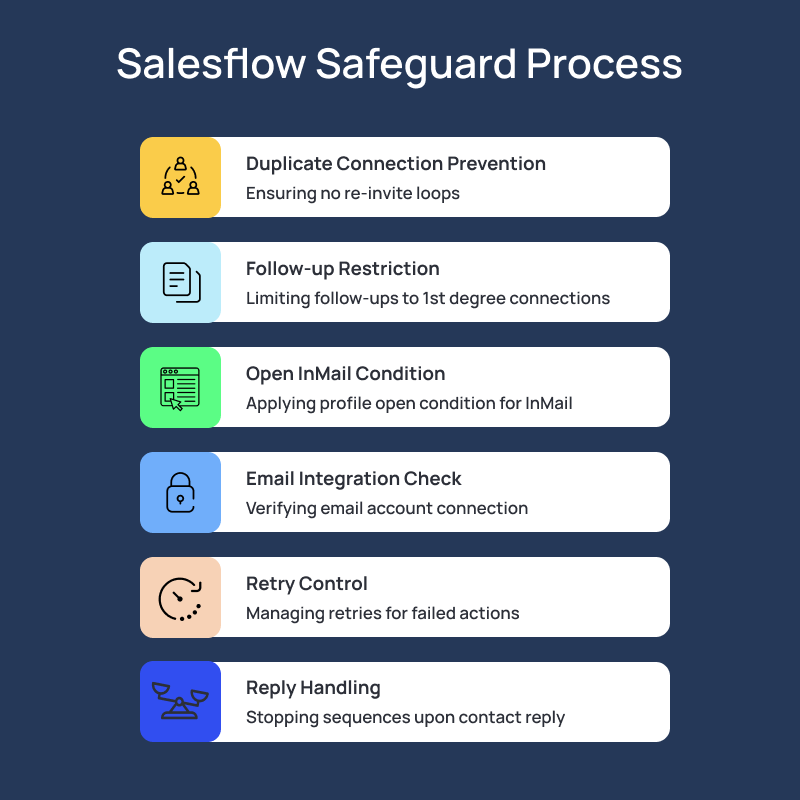
When it comes to dynamic outreach, several guardrails are built directly into Salesflow to prevent common outbound mistakes:
- No duplicate connection requests in the same branch: A connection request can only be added once per branch, preventing re-invite loops.
- No follow-ups to non-connected contacts: Follow-ups are only available for 1st degree connections. The system won’t allow invalid paths.
- Open InMail only when profile is open: Adding Open InMail automatically applies the If open profile condition, ensuring it only runs when allowed.
- Email requires active integration: If your campaign includes email but no email account is connected, the campaign cannot start.
- Controlled retries for failed actions: Temporary failures (like limits) are retried when safe. Invalid actions are skipped and logged clearly.
- Replies automatically stop the sequence: When a contact replies, they’re muted, and no further steps are executed.
The result is adaptive logic without structural risk.
Limits, Scheduling, and What to Expect Operationally
Dynamic Outreach operates within the same structural controls as the rest of Salesflow, with added logic on top.
- Account-level and campaign-level limits apply: Connection requests, follow-ups, emails, Open InMails, profile visits, and likes all respect daily limits. Campaign-level ranges control how many actions are executed per run.
- Working hours and time zones are enforced: Campaigns run according to your configured schedule. If an action falls outside working hours, it moves to the next valid window.
- If limits are hit, actions are delayed or safely skipped: Temporary limit issues are retried or shifted to the next working day when applicable. Invalid actions are skipped and logged clearly.
- Clear progress tracking
You can monitor:
- Contacts in progress (entered the sequence)
- Contacts completed (reached the end of their branch)
Campaign alerts also notify you when a campaign is almost finished or fully completed.
In short, Dynamic Outreach adds adaptive logic, without removing operational control.
Who Should Use Dynamic Outreach (And Who Shouldn’t)
Dynamic Outreach isn’t necessary for every outbound setup.
You should consider it if you:
- Want to combine LinkedIn and email together in one sequence
- Need email only, or want to run all LinkedIn actions in a single campaign
- Want to customize your own workflow and need branching logic without building separate campaigns
- Need consistent follow-up based on connection status or engagement
- Want to reduce manual “check status, then decide” steps
It may not be necessary if you:
- Only run a single, simple linear motion
- Don’t need conditional channel switching
- Rely on campaign sharing or duplicating across accounts (not supported at this time)
For your simpler outreach needs, consider using our ‘Multichannel Campaign’ type or ‘LinkedIn Campaign’ type instead
From Linear Sequences to Adaptive Outbound
All teams use and need branching logic, so the question isn’t whether your team uses branching logic.
It’s whether that logic lives in spreadsheets, Slack messages, and duplicated campaigns, or inside the campaign itself.
Dynamic Outreach moves that decision-making into the sequence builder.
- Connection status determines the next step.
- Email availability determines the channel.
- Engagement determines progression.
You define the structure once. Salesflow evaluates the conditions and executes the appropriate action, within your limits, schedule, and guardrails.
If you’re running LinkedIn and email together, and you’re tired of managing multiple campaign variations just to handle basic scenarios, it’s time to try a different structure.
Try Salesflow’s new Dynamic Outreach and build your first condition-based sequence today.
FAQs:
.svg)


.png)