The bar for LinkedIn outreach has risen sharply in 2026. Generic templates get ignored, and anything that feels automated gets treated as spam. Analysis of over 13 million LinkedIn connection requests sent between May 2025 and April 2026 found a platform-wide average connection acceptance rate of 28.5% and a message reply rate of 10.4%. The gap between average and top-performing campaigns is significant, and it comes down almost entirely to message relevance and personalisation.
These templates are designed to feel personal even at scale. To help you get it right, we’ve used the insights from our sales, business development, and done-for-you campaign experts to create a series of plug-and-play templates.
2026 LinkedIn Outreach Benchmarks: What Good Looks Like
Use these as your baseline before launching any campaign. If you are consistently below these numbers, the issue is either targeting, message quality, or both.
Connection request acceptance rate
The platform-wide average across all campaign types is 28.5% based on data from over 13 million connection requests. A good benchmark for well-targeted B2B campaigns is 30 to 45%. Below 20% signals targeting or profile issues that need fixing before scaling volume.
Connection note reply rate
The platform-wide average for connection note replies is 3.0%, and this figure has been in measurable decline, dropping from 3.5% in May 2025 to 2.2% in April 2026, a 37% relative decline over twelve months. The implication: the connection note is weakening as a pipeline channel. Focus your energy on the follow-up sequence after acceptance, not on the connection note itself.
Message reply rate (post-connection)
Message reply rates held flat at 10 to 11% across the year, showing no erosion despite rising outreach volumes. Good performers hit 25 to 35%, and top-tier campaigns achieve 35 to 50% through personalised, multi-touch sequences.
InMail response rate
The average response rate for LinkedIn InMail messages is 10 to 25%, compared to cold email's 1 to 5%. Top performers see 30 to 40% response rates on InMail campaigns.
Does including a note with your connection request help?
There is little difference in connection acceptance rates between requests that include a note and those that do not (26.42% vs 26.37%). However, adding a brief message leads to a significantly higher response rate of 9.36%, compared to 5.44% without a message. If your goal is to start a conversation, always include a short, personalised note.
New connection campaigns (connection request + follow-ups)
Connection request cadences are the standard way to generate leads on LinkedIn. By sending a connection request, you invite other platform members into your network. Once they accept, they become first-degree connections and you can message each other directly with no message limits.
The true value of these cadences is in the follow-up sequence. The connection note itself is a low-performing touchpoint in 2026. The follow-up messages are where you warm up and convert leads.
Connection request templates
Although the real value of connecting lies in the follow-up, you won’t be able to directly message a lead until they accept your initial invitation. With a limit of 200 characters for each connection request invite, that means the pressure is on to grow your network. To help you get the best results, we’ve included multiple options for connection request templates. Try each out for yourself and choose whichever gets the best results for your audience.
Option 1
Dear [name],
As you plan ahead for the next quarter at [company], are you looking to add [service you provide/service your product makes possible]? I’d love to connect and see if my company could help with [initiative].
Best,
[your name]
Option 2
Hi [name],
Do you currently offer [service] at [their company]? I’d love to connect and give you more info on how you can [benefit from your offering or service].
Best,
[your name]
Option 3:
Hi [name],
Are you facing issues with [pain points your product can solve] at [their company]? I’d love to connect and explore how we could support with [service you offer].
Best,
[your name]
AI personalisation tip for connection requests:
Before sending, use LinkedIn's Account IQ or Lead IQ (available on Sales Navigator Core and above) to identify one specific detail about the prospect like a recent post, a job change, a company announcement, and swap out the {pain point} or {initiative} token for something genuinely specific to them. This single change is what separates a 28% acceptance rate from a 45% one.
Follow-up templates
You can load up your entire connection request cadence into a LinkedIn automation tool like Salesflow at the very beginning of your campaign. However, only users that connect will receive the follow-up messages below.
Follow-up 1
Hi [name],
Thanks for connecting. I wanted to reach out as we both [point of connection], and your role as [job title] stood out to me.
At [your company], we [service offer] for [company type] like [their company]. If you’re facing issues with [core pain point], we can help with:
[tangible benefit 1]
[tangible benefit 2]
[tangible benefit 3]
Would you be up for a quick call to discuss further?
Best,
[your name]
Follow-up 1 (alternative option)
Hi [name],
Thanks for connecting. Can I assume you’re either already [situation you can help with] or anticipate this shortly?
My company, [your company name], [core value proposition]. We help companies like [their company] [most beneficial feature/outcome for this buyer persona].
Would you be interested in discussing further on a quick call?
All the best,
[your name]
Follow-up 2
Hi [name],
If you’re struggling with [pain point], [your company] can [core benefit for this buyer persona] with [process/ease of use benefit].
We recently worked with [similar company] to:
- [core statistics and social proof to show evidence of success]
I’d love to discuss further on a quick call – when would work best this week?
Kind regards,
[your name]
Follow-up 3
Hi [name],
Hope you’re keeping well.
Just wanted to check in and see if you’ve given any thought to using [your company] to [your key service]?
I understand you’re likely very busy at [company] – but [quick line about how your service can help them gain that time back].
Worth a quick call to discuss?
Best,
[your name]
Follow-up 4:
Hi [name],
Since I’ve not heard from you since we connected, I assume that [service you offer] isn’t top of mind at [company] right now.
If that’s not the case and you’re just super busy, is there anyone else in your department I should get in touch with?
Best,
[your name]
Follow-up 5:
Hi {name},
Saw that {company} just {funding announcement / new hire / product launch}. Congrats.
We've worked with a few companies at a similar stage to help them {specific result}.
Worth a quick 15 minutes to see if there's a fit?
Best,
[your name]
Follow-up 6:
Hi {name},
I came across your profile while researching {topic} and thought it was worth reaching out.
We help {ICP type} {specific result}.
Would you be open to a quick conversation?
Best,
[your name]
Best practices for your LinkedIn outreach templates
Check you’ve followed all of the points below:
- Include at least two follow-ups, but no more than four within two weeks
- Leave a day or two between each follow-up. Increase the gap as you progress through the cadence
- Keep the connection note short. Including a note does not meaningfully improve acceptance rates (26.42% with a note vs 26.37% without), but it nearly doubles your reply rate if someone does accept (9.36% vs 5.44%). Keep it to one sentence maximum. So
- The first follow-up after acceptance should be your longest. Explain what you offer and lead with a relevant pain point or result
- After the first follow-up, alternate stats and social proof with short one or two line check-in messages
- A/B test your connection note and first follow-up. Run two versions in parallel in Salesflow and compare reply rates after 50 to 100 sends
Want more templates? Check out our 100+ cold messaging templates here.
InMail campaigns
When sending LinkedIn InMails, your cadences will likely only have one step. That’s because InMails work differently from other campaign types. Users have to reply to an InMail to continue the conversation. Plus, unless you’re using an Open InMails campaign, each message costs a precious InMail credit.
Nonetheless, InMails are a fantastic way to capture the attention of unresponsive leads. Unlike connection requests, they’re not restricted to 200 characters, so they’re great for messages that require more detail. They also don’t require a user to connect with you to talk: perfect for leads that rarely add others to their LinkedIn network.
Because InMail cadences are necessarily short, we find companies that mix InMail campaigns with other cadence formats that have multiple touchpoints get the best results. That requires splitting your prospect list across different campaign types.
To decide on the split, you could pull out important decision makers and experiment with sending them more in-depth, tailored messages via InMail. Then, you could add a larger selection of leads to either a new connection or a shared group campaign. For the best results, remember to A/B test your strategy and pick the approach that resonates most with your audience.
Here’s a standard LinkedIn InMail template you can use as the basis of your outreach:
InMail template
N.B. Since you’re sending an InMail message, you’ll need to include a subject line. Think of it as being exactly like an email. Here’s a basic InMail subject line template you can tweak for your own purposes:
Subject: [Your service] for [benefit your service offers]
Alternatively, try:
Subject: [Your service] to [overcome pain point]
Dear [name],
Hope you’re well. I wanted to reach out as I see you’re responsible for [job title] at [company name].
At [your company], we [what you do for accounts like [their company]]. If you’re facing issues with [pain point], we can:
- [tangible benefit #1]
- [tangible benefit #2]
- [tangible benefit #3]
Would you have time this week for a quick call to discuss your needs?
Kind regards,
[your name]
Best practices for InMail outreach templates
To get the best results, follow this checklist:
- Keep your InMail under 800 characters
- Include statistics and social proof to back up your claims where possible
- Include a call to action in your final sentence (and make sure it’s obvious to prospects what action to take)
- Break your message up with bullet points to emphasize core messages and improve comprehension
Check out our complete guide to LinkedIn InMail best practices for more pointers on improving your response rates.
Should you follow up?
If one InMail isn’t enough and you want to follow up with a promising lead, you might have to run this as a new separate cadence. Consider whether another InMail message makes the most sense compared to a connection request campaign.
If you decide to send a second InMail, keep it short. Aim to check-in rather than offer a big sales pitch. Here’s a template you can use:
Hi [name],
Hope you’re well. How are you getting on with [pain point] at [their company]?
I really believe [your solution] can help you [tangible benefit that will help them overcome the issue], for all the reasons mentioned above. Let me know if you’re interested in discussing this further?
Remember, if a user clicks ‘not interested’, you shouldn’t follow up (and you won’t be able to message them about your original InMail anyway). Second attempts should only be used on those that haven’t responded.
Also, consider the likelihood that these prospects will engage if you message them a second time. InMail credits are limited (except for Open InMail campaigns), and you don’t want to waste them.

Groups & Events campaign templates
Groups and Events cadences are campaigns you can send to LinkedIn members who are part of the same group as you or who have attended the same event.
They’re ideal ways to conduct outreach as they don’t come with the message restrictions seen in InMail and connection request campaigns.
Sending these cadences requires a little upfront legwork. Namely, you’ll have to join relevant LinkedIn groups and events before you can conduct outreach. Once you’re in, you can copy and paste the following sequence to prospects to scale your lead generation.
Template 1 (first message)
Dear [first name],
I hope you’re doing well. I wanted to reach out as we’re both [part of the same group/attending the same event] and your role as [job title] stood out to me.
At [your company], we [what you do] for accounts like [their company]. If you’re facing issues with [pain point], we can help with:
[benefit 1]
[benefit 2]
[benefit 3]
Would you have time for a quick call this week to discuss your needs?
Template 2 (follow-up 1)
Dear [first name],
I wanted to follow up as I’m keen to help [their company] with any [pain point] issues that might be impacting you.
At [your company], our [product/service] is designed to [benefit for companies like their company]. We have [features that support the benefit] and even offer [best feature that supports the benefit].
When would work for a quick call about your needs?
Kind regards,
[your name]
Template 3 (follow-up 2)
Dear [first name],
Just following up on the above. Are you open to exploring how [your product/service] could help you [most impressive benefit, ideally with tangible stat/result]? If so, when would be a good time for us to connect?
All the best,
[your name]
Template 4 (final follow-up)
Dear [first name],
I understand you’re probably very busy and might not have had time to consider our [service/product], so I wanted to quickly follow up on the above.
Would you have time this week for a quick call to discuss how we can help [company]?
Alternatively, if there’s someone you recommend speaking to instead, I’d be happy to follow up with a colleague!
If you just don’t have a need right now, do feel free to reach out in the future. I’m always happy to discuss requirements.
All the best,
[your name]
Best practices for Groups and Events outreach templates
- Wait a few days between your first message and your follow-up.
- Wait about a week between the first follow-up and the second, and about two weeks between the second follow-up and the third.
- Try to focus on attracting more leads rather than messaging the same leads too often. (This is why we recommend a maximum of four outreach attempts in one go per each type of cadence).
- Try to alternate longer messages with shorter follow-ups to maximize the chance a lead will actually read your outreach.
Groups template, the shared interest opener
Hi {first name}, I noticed we're both in {group name} and that you recently posted about {topic they posted about}.
You made a good point about {specific thing}.
We're actually working on something directly related to that problem, not sure if it's relevant, but would it be worth comparing notes on a quick call?
Voice Note Outreach: The 2026 Format Most Sellers Are Ignoring
LinkedIn voice notes are available in the mobile app and can be sent to first-degree connections. They are one of the most underused outreach formats in 2026, and one of the most effective.
Standard LinkedIn cold messages have a non-reply rate of around 80%. Adding a short, human-sounding voice note increases reply rates by 30 to 40%.
Voice notes work because they are rare, they feel personal, and they are almost impossible to confuse with automated outreach. A 30-second voice note saying something specific to the prospect cuts through a crowded inbox in a way that no text template can.
How to use voice notes in your cadence:
Use voice notes as a mid-sequence touchpoint, not as your opening message. The most effective placement is after your first text follow-up has been sent but not replied to. A short voice note referencing your previous message gives the sequence a human quality that often unlocks responses from leads who were close to engaging but had not yet replied.
What to say in a LinkedIn voice note (30 to 45 seconds):
"Hi {name}, this is {your name} from {company}. I dropped you a message last week about {topic} and wanted to follow up personally. We've been helping {ICP type} {specific result} and I genuinely think there's a fit here. Would love to get 15 minutes on the calendar this week if you're open to it, just reply here or book directly via the link in my profile. Thanks."
Keep it under 60 seconds. Mention something specific to them or their company. End with one clear, simple call to action.
Note: Voice notes cannot currently be automated. They work best for your highest-priority prospects, the top 10 to 20% of your list where a booked meeting has the highest potential value.
Read our guide to using voice notes in LinkedIn outreach here.
.jpg)
AI Personalisation Tips for Every Template Type
Automation scales volume. AI scales relevance. Here is how to add genuine AI personalisation to each campaign type without doing it manually for every prospect.
For connection requests: Use Sales Navigator's Lead IQ to pull a one-line insight about the prospect before sending. Swap the {pain point} token in your template for something specific to their situation. A single personalised sentence in a 200-character note meaningfully improves post-acceptance reply rates.
For follow-up sequences: Use Salesflow's dynamic variables to pull in personalised fields beyond first name and company. Role, industry, recent activity, and mutual connections all make strong personalisation tokens when used in the right context.
For InMails: Use Account IQ to generate a one-paragraph summary of the prospect's company before writing your InMail. Reference a specific business signal, a hiring surge, a new product launch, a recent funding round, in the first line of your message. This is the single highest-leverage change you can make to InMail response rates.
For Groups and Events: Check the prospect's recent group activity before sending. If they have posted or commented recently, reference it directly. A message that says "I saw your comment on {post}" performs significantly better than one that just references the shared group.
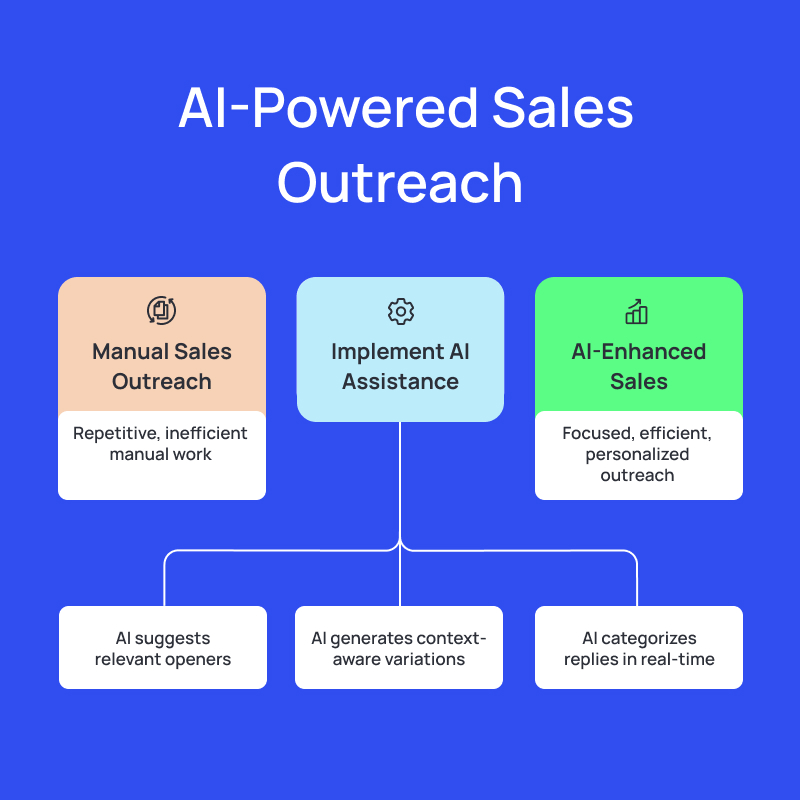
If you want to use AI more thoroughly in your sales workflows, check out our AI ebook guide that helps you get started with using AI.
A/B Testing Your Templates in Salesflow
A/B testing is the fastest way to improve your campaign performance consistently over time. In Salesflow, you can run two versions of any campaign simultaneously and compare results directly in the analytics dashboard.
What to A/B test first:
Start with your connection note or InMail subject line. These are the highest-leverage elements because they determine whether anyone reads the rest of your message at all. Run version A and version B to 50 prospects each before drawing conclusions.
Once you have a winning connection note, test your first follow-up opening line. Then test your call to action. Work down the funnel one element at a time.
What counts as a meaningful result:
With LinkedIn outreach, the platform-wide average message reply rate sits at 10.4%. If one version of your message is consistently above that and the other is below it across 50 or more sends, the difference is meaningful.
What to do with the results:
Archive the losing version, make the winning version your control, and test a new challenger against it. Teams that run continuous A/B tests across their campaigns compound their results over time. A 1 to 2 percentage point improvement in reply rate per month adds up to a meaningfully better pipeline within one quarter.
Find and use our free A/B testing worksheet here.
Implement winning LinkedIn outreach templates
LinkedIn outreach messages don’t have to be a source of stress. With the templates above as a starting point, you’ll soon be on your way to campaigns that convert leads.
Once you’re ready to give them a go, try Salesflow. Our LinkedIn lead generation software lets you upload all your campaign templates in one go, then add prospects for winning results that scale.
Try us today for free with a 7-day trial (no credit card required).
Start your free Salesflow trial
.svg)