.png)
Prefer listening?
Hear the audio version of this article here:
Most outreach sequences are built backwards.
They start with what the seller wants: eight touches in fourteen days, three LinkedIn messages, two emails, and one bump.
It looks tidy in a spreadsheet, but buyers don’t move in tidy steps. They don’t wake up thinking, “I’m on step three of this sequence.”
They move in moments: do I recognize this person, do I trust them, is this worth my time right now?
The job of a sequence isn’t to force a quick conversion; it’s to build familiarity. And that’s why the best sequences are buyer-driven; they’re designed around how people make decisions, so that when the timing is right, next week or next quarter, your name should be the first one they remember.
This guide will show you how to do just that. You’ll see:
- How to map LinkedIn and email touches to the way buyers think
- Follow-ups that add value
- Real-life examples you can plug and play for multiple industries
- Simple ways to optimize campaigns
Let’s dive in.
Why Multichannel Sales Automation
Single-channel outreach assumes your buyers live in one place. They don't.
Your prospect might see your LinkedIn connection request during their commute, ignore your first email because it landed during a busy morning, then finally engage with your follow-up message two weeks later when they're thinking about the problem you solve.
Most teams hear "multichannel" and think it boils down to using LinkedIn and email simultaneously (which it does, but how you use both matters here). Send a connection request, fire off an email the same day, then wonder why people don’t respond.
Good multichannel sequences understand that LinkedIn and email serve different purposes in your prospect's decision-making process. LinkedIn answers "should I pay attention to this person?" and email answers "what exactly are they asking me to do?"
How do you use this distinction to your advantage and design multi-channel sequences accordingly? More on that in the next section.
Cross-Channel LinkedIn Sales
One of the biggest questions in any sequence is order: do you lead with LinkedIn, or lead with email? The answer depends on your ICP.
The order matters more than most people think.
LinkedIn first, then email? You're building social proof before asking for anything. Email first, then LinkedIn? You're following up on something they might have missed. Both approaches work, but they work for different reasons and different types of prospects.
Your ICP research should tell you where your prospects spend time, so if you’re going after founders, consultants, or recruiters, people who tend to live on LinkedIn, start there. A connection request or a quick comment on a post warms the contact, so your email later doesn’t feel cold.
If your ICP is more traditional, i.e., senior execs, IT buyers, or industries that check LinkedIn once a month, flip it. Lead with email, then use LinkedIn as a secondary touch to stand out from the inbox.
There is also a compliance piece here that is often overlooked. LinkedIn has connection limits (about 100-200 per week) and message limits for free accounts, and email has CAN-SPAM requirements.
Build your sequences within these guardrails, not around them. Getting your LinkedIn account restricted kills your entire multichannel strategy. And email deliverability tanking is far more common than you think (in fact, 1 in 6 emails don’t even hit the inbox).
Salesflow makes sure your LinkedIn and email outreach work together, stay within limits, and drive replies instead of restrictions with our built-in color-coded tooltip in our analytics dashboard:
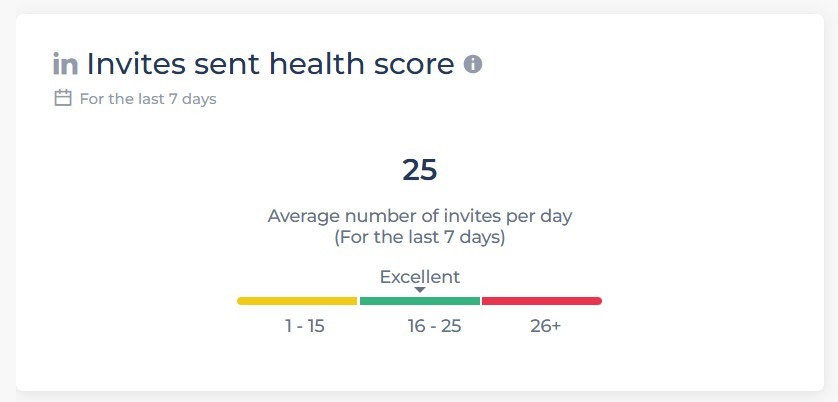
If you’re looking for safe, multi-channel outreach automation, sign up for our 7-day free trial here.
Best LinkedIn + Email Sequences (By Use Case)
There isn’t one “perfect” sequence that works for every industry. The right flow depends on who you’re reaching out to and what you’re asking them for.
A SaaS founder raising a seed round doesn’t think the same way as a VP of HR, and a recruiter filling roles can’t use the same copy as someone selling IT services.
Instead of a one-size-fits-all playbook, here are three proven use cases with LinkedIn + email sequences you can adapt right away. This can give you an idea about how to build sequences that work for your specific use case.
Example LinkedIn Drip Campaign For SaaS Startups
Early-stage SaaS buyers are flooded with noise. Founders, GTM leads, and product managers are constantly pitched, which means your sequence needs to stand out by being short, specific, and relevant. Timing and proof are the two levers that matter most.
Here’s a simple four-touch LinkedIn + email sequence that works well:
Day 1 (LinkedIn Connection Request): Keep it short and contextual. Reference a trigger like recent funding, a product launch, or a mutual connection. The goal is to simply get connected.
Day 3 (Email): Send a short intro email that makes the link clear. “Saw your funding round” or “noticed your launch” + one-line proof of credibility + a low-friction next step (like sharing a quick playbook).
Day 7 (LinkedIn Message): Add value by sharing a relevant resource, a one-liner insight, or even commenting on something they’ve posted.
Day 10 (Email): Now you can go direct. Share a short case study or result from a similar SaaS company, then make the ask for a quick chat.
Effective LinkedIn Outreach Flow For Recruiters
Recruiting outreach is different from sales. You’re often contacting people who aren’t actively looking, which means the tone has to be light and respectful.
Here’s a simple LinkedIn + email flow that works:
Day 1 (LinkedIn Connection Request): Personalize it to the role or team you’re hiring for. Something as simple as, “noticed your experience in scaling data teams,” makes it relevant without pressure.
Day 2 (LinkedIn Message): Once they accept, send a short note that shows why you thought of them: “We’re building out a data team at X, and your background stood out.”
Day 5 (Email): Add a bit more detail about the opportunity: “Not sure if you’re open, but thought you might be a fit. If not, happy to keep you in mind for future roles.”
Day 9 (LinkedIn Message): Light follow-up to check interest: “Just wanted to see if this is worth a quick chat.”
LinkedIn Messaging Script For IT Service Sales
Prospects in this space are usually risk-averse: they want to know you can deliver, that you’ve done it before, and that you understand their technical challenges. Your outreach should focus on credibility.
Here’s a sequence that works:
Day 1 (Email): Lead with relevance. Mention a similar client you’ve worked with, a problem you solved, or an industry-specific challenge. Keep it short.
Day 3 (LinkedIn Connection Request): Reference something concrete: shared tech stack, mutual connection, or a local presence.
Day 6 (Email): Share proof. A short case study, key results, or a stat that demonstrates reliability. IT buyers care more about whether you can deliver than how witty your message is.
Day 10 (LinkedIn Message): Light CTA. Instead of “Let’s book a call,” try “Happy to share how we solved X for [similar company].” It keeps the door open without pushing too hard.
LinkedIn Plus Email Drip Setup (Step-By-Step)
To make LinkedIn and email work together effectively, you need to design the flow with intention from the start. Here’s how to do it without overcomplicating things:
Step 1: Define Your ICP Clearly.
First, get specific about who you’re targeting. The order, tone, and even the channel you lead with will depend on whether you’re reaching out to a founder, a VP of IT, or a recruiter.
Step 2: Pick Your First Channel.
Use LinkedIn first if your audience lives there (founders, consultants, recruiters). Use email first if they don’t (senior execs, technical buyers). The order matters more than most people realize.
Step 3: Map The Touches.
Think of LinkedIn as the place to build recognition and credibility, and email as the place to spell out the ask.
A clean flow might look like: LinkedIn connection → Email → LinkedIn follow-up → Email with proof.
Step 4: Write Messages That Add Up.
Each touch should serve a purpose. Connection request = awareness. First email = context. LinkedIn message = familiarity. Final email = proof and ask.
Step 5: Respect The Guardrails.
LinkedIn has connection limits. Email has deliverability risks. Don’t ignore either.
When you put these steps together, you get a drip sequence that feels natural to your buyer and manageable for your team. That’s what makes it repeatable.
Salesflow makes this process a lot easier. Instead of juggling spreadsheets or worrying about limits, you can build LinkedIn + email drip campaigns in one place, with the right pacing baked in.
If you want to see what that looks like in action, start your 7-day free trial today.
How Do I Configure LinkedIn Message Sequences For Maximum Response?
On LinkedIn, unlike email, the attention span is shorter, the context is different, and the expectation is networking. Here are a few things that can help:
- Touch Count: 5 messages maximum. Most replies happen in the first 3 touches anyway.
- Spacing: Don't message every other day. Space messages 4-7 days apart. If you connect on Monday, wait until Wednesday to send your first message.
- Personalization: Reference something relevant: their recent post, a mutual connection, a company announcement.
Test These Variables
- Connection requests with notes vs. without
- Questions vs. statements as openers
- Short messages vs. longer ones
- Pain points vs. role challenges
Don't:
- Pitch in message one
- Copy-paste email templates
- Message multiple people at the same company with identical text
- Ask for meetings before building rapport

LinkedIn and Cold Email Integration
Running LinkedIn and email together may sound simple, but most teams struggle with it. Juggling LinkedIn in one tab, email in another, and a spreadsheet in between quickly turns into lost context and duplicate messages.
There are a few ways to handle it:
- Native setups (LinkedIn directly + CRM for email) work if you’re only running a handful of prospects. At scale, they break down, and you’ll spend more time managing workflows than selling.
- API-based integrations are cleaner. A connection accepted on LinkedIn can trigger an intro email automatically. A reply on LinkedIn can pause an email sequence so you don’t double-message. This experience is less jarring for your buyer.
Tracking matters too. Without UTMs and clean hygiene, you won’t know whether it was LinkedIn or email that drove the reply. That makes campaign optimization guesswork.
This is where Salesflow helps.
With Salesflow, LinkedIn, and email live in the same workflow, so touches are synced, replies are tracked by channel, and built-in limits keep you compliant. Instead of bouncing between tools, you run one clean sequence across both channels.
Automated LinkedIn & Email Workflow
The best outreach cannot happen in silos. A LinkedIn touch here, an email there, unless it’s stitched together, it feels random to the buyer and messy for you. That’s why an automated workflow matters. It connects the dots so every touch builds on the last.
Here’s what a clean LinkedIn + email workflow looks like:
- Enrollment rules: Define who enters the sequence and when. For example, new leads that match your ICP tags in LinkedIn or prospects added from your CRM.
- Branching logic: If someone connects but doesn’t reply, they move into an email step. If they reply on LinkedIn, the workflow pauses automatically.
- Stall and bounce handling: No more chasing dead ends. Good workflows flag bounced emails or declined connections and route those prospects out.
- Handoff to sales: Once a reply comes in, the lead should be routed to the right SDR or AE immediately.
This is where Salesflow fits in. You can build multi-channel sequences safely inside the platform and track everything in one dashboard. See the analytics dashboard in action here:
If you’re looking to automate LinkedIn and email together without losing control, Salesflow makes it simple. Start your 7-day free trial and see how much easier multichannel outreach can be.
LinkedIn + Email Lead Nurturing
Not every lead is ready to book a call the moment they accept your connection or open your email. Some are curious but not urgent, some are evaluating options, and some just aren’t ready yet. That’s where lead nurturing comes in.
Think of nurturing as the “in-between” stage: you’re not pushing for a meeting every time, but you’re also not going MIA. Instead, you’re building familiarity and trust until the timing lines up.
Instead of hammering the same CTA, you run warm, light-touch sequences designed to build familiarity over weeks or months:
- On LinkedIn: show up in their feed, comment on a post, or send a short message with an industry update.
- Over email: share a case study, a quick insight, or a trend report that ties back to the problem you solve.
And, don’t forget about recycle logic: if a prospect goes cold after showing interest, drop them back into nurture instead of removing them completely. Priorities change, and staying visible keeps the door open.
Salesflow makes this easy by letting you set up a campaign in 5 simple steps. You can build long-tail LinkedIn sequences, layer in content-driven emails, and track when prospects move from nurture to ready.
If you want to stay top-of-mind with leads, Salesflow gives you the system to do it.
LinkedIn And Email Follow-Ups
Most reps give up too early. They send one LinkedIn message or one cold email, get no reply, and move on. The reality is that most responses come in the follow-up, but only if those follow-ups are done well.
When it comes to follow-ups, you can:
- Bump the thread with a polite nudge (“just circling back”), which is fine once, but overused, it feels lazy.
- Add net-new value with a case study, a resource, a short insight, or even a thoughtful question. This is what usually nudges people to take action.
Objections are part of the game too. Instead of trying to “crush” them, acknowledge and adapt:
- “Now’s not a priority” → shift them to a nurture sequence. The best follow-ups respect the buyer’s timeline.
- “We already have a tool/vendor” → share a differentiator or niche angle.
- “No budget” → check timing and recycle for later.
Follow-Up Sequences That Boost LinkedIn Reply Rates
Follow-ups work best when they give people a reason to engage. Here are two proven flows you can adapt:
Sequence 1: Value-First (Great For SaaS Or Services)
- Day 1: Connection request with context (funding, product launch, mutual connection).
- Day 3: First message: short intro + relevance, no ask.
- Day 7: Follow-up with net-new value (short case study, resource, or insight tied to their role).
- Day 12: Light CTA: “Worth a quick chat to share how we helped X with Y?”
- Day 18: Polite exit or recycle: “Happy to circle back if timing’s better later.”
Sequence 2: Conversation-Driven (Great For Recruiters Or High-Touch Outreach)
- Day 1: Connection request personalized to their background.
- Day 2: First message: recognition (“noticed your experience in X”), no pitch.
- Day 5: Question to start a dialogue (“Curious, are you open to new roles right now?”).
- Day 9: Follow-up email or message with more detail, framed as optional, not pushy.
- Day 14: Gentle close: “No worries if now is not the right time, I’d be glad to stay connected.”
Both flows share the same logic: 3-5 touches, spaced out, with each step adding something new.
Salesflow lets you build these sequences directly into your workflow, track which messages get the most replies, and adjust timing until you find the sweet spot.
Proven LinkedIn Message Templates For Cold Outreach
Cold outreach works best when your messages are short and clear. Think of it as: Context → Relevance → Ask.
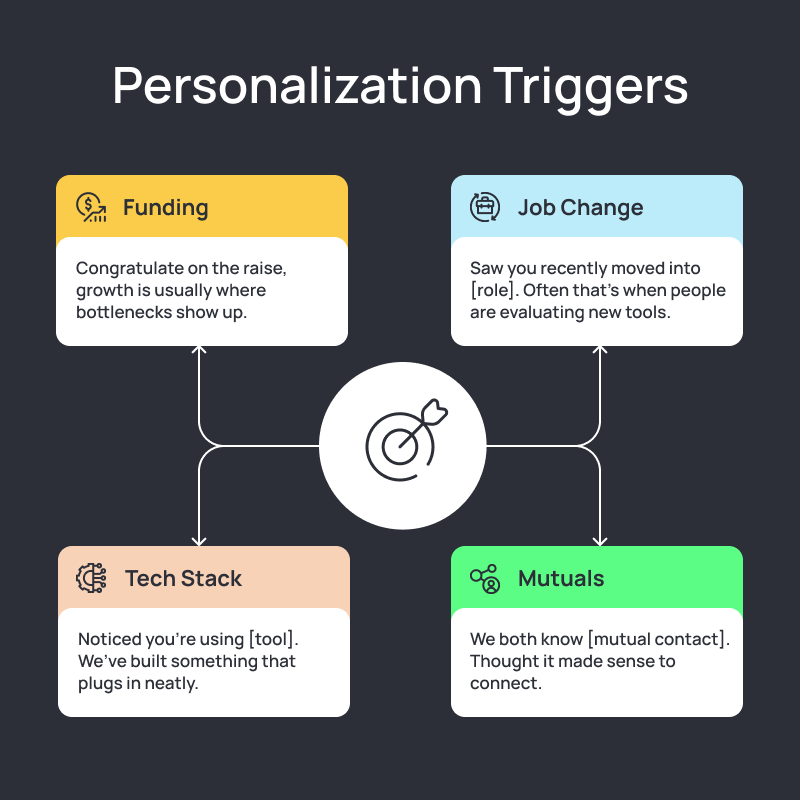
To make cold messages work, anchor it to a personalization trigger:
- Funding: “Congrats on the raise, growth is usually where bottlenecks show up.”
- Job Change: “Saw you recently moved into [role]. Often that’s when people are evaluating new tools.”
- Tech Stack: “Noticed you’re using [tool]. We’ve built something that plugs in neatly.”
- Mutuals: “We both know [mutual contact]. Thought it made sense to connect.”
A few templates you can copy-paste:
Connection Request Templates
Recent Funding/News: "Hi [Name], saw the news about [Company's] Series A. Scaling from [previous stage] to [current stage] brings interesting challenges around [relevant area]. Worth connecting?"
Mutual Connection: "Hi [Name], [Mutual connection] mentioned you're dealing with [specific challenge] at [Company]. We've helped similar companies tackle this. Worth connecting?"
No Connection Note (Higher Accept Rate): Just send the connection request without a note. Acceptance rates are typically higher.
First Touch Messages
Problem-Aware Prospects: "Hi [Name], quick question, how are you currently handling [specific challenge] at [Company]? Most [their role] mention this as their biggest bottleneck right now."
Problem-Unaware Prospects: "Hi [Name], noticed [Company] is growing fast in [market/geography]. That usually creates challenges around [predictable problem area]. Seeing that at [Company]?"
Re-Engagement Templates
After No Response: "Hi [Name], sent a message a few weeks back about [topic]. Even if the timing isn't right now, I'm happy to answer any quick questions about [area of expertise]. Most [their role] find [specific insight] useful for planning."
Trigger-Based: "Hi [Name], saw [Company] just announced [recent news]. That probably changes your priorities around [relevant area]. Worth a quick conversation about how other companies handle this transition?"
Want more templates that you can plug and play? Head over to our bank of 100+ LinkedIn message templates.
Sequence Optimization & Campaign Optimization Tips
Most teams measure success by “Did I book a meeting?”
The problem is, if that’s your only metric, you have no idea where things broke down. Sequence optimization is about breaking the process into smaller steps, fixing the weak link, and then testing with intention.
Step 1: Build A Metrics Ladder
Think of your sequence as a ladder where each rung tells you something:
- Connect-rate → Is your profile and connection note strong enough?
- Open rate → Are your subject lines earning attention?
- Click rate → Does your content or resource spark interest?
- Reply rate → Is your message relevant?
- Positive reply rate → Are you asking for the right thing?
- Meetings booked → Are you qualifying and converting properly?
In Salesflow, the multi-channel analytics dashboard tells you everything you need to know and more. See it in action here:
Step 2: Run A Clear Test Plan
Don’t “try random tweaks.” Test one variable at a time:
- Subject hooks (question vs. statement).
- Opener length (2 lines vs. 5 lines).
- Message length (emails with 6-8 sentences tend to perform better)
- CTA position (early in the message vs. at the end).
- LinkedIn-first vs. email-first touches.
Controlled changes let you see what moves the needle.
Step 3: Slice Your ICP
A VP of IT doesn’t relate to the same things as a SaaS founder. Segment by:
- Title (manager vs. C-suite).
- Seniority (decision-maker vs. influencer).
- Industry (tech vs. traditional).
Patterns appear fast once you split the data.
And for leads that went cold after a few touches? Run win-back plays. A new case study or a relevant market trend can reopen the door months later.
Automated QA & Compliance Guardrails
Nothing kills a campaign faster than a restricted LinkedIn account or email domain that’s blacklisted. Automation helps you scale, but only if it’s set up with safety baked in.
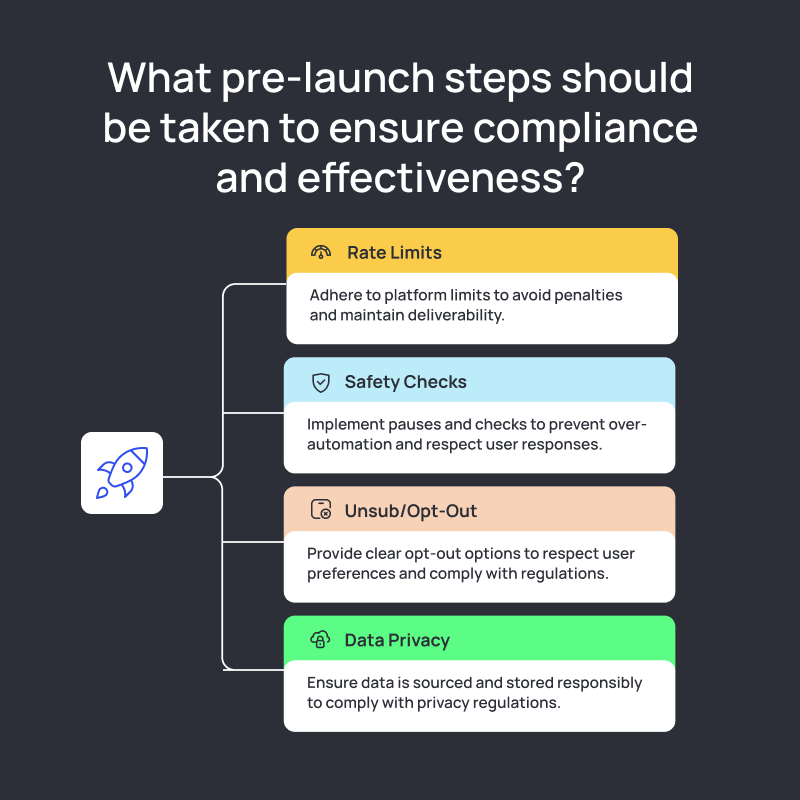
A few things to lock down before you launch:
- Rate Limits: LinkedIn caps connection requests (about 100-200 per week) and messages for free accounts. Push too far and you’ll get flagged. Email has the same issue: if you’re sending 200+ cold emails a day from one domain, deliverability tanks.
- Safety Checks: Build pauses into your workflow. If someone replies, stop the automation. If a connection request bounces, drop them.
- Unsub / Opt-Out: Buyers should have a way to say no, and you should respect it. That means opt-out links in cold emails and clear stop points on LinkedIn.
- Data Privacy: GDPR, CCPA, and other regulations aren’t optional. Make sure the data you’re using (emails, job changes, funding triggers) is sourced and stored responsibly.
Salesflow bakes these guardrails in: safe connection limits, reply detection that pauses sequences, analytics that highlight risky activity, and built-in compliance features to keep your outreach on the right side of regulations.
If you want outreach that scales without putting your accounts at risk, start your 7-day free trial of Salesflow and see how automation can be safe by design.
Operationalizing Your Best LinkedIn + Email Sequences
A good sequence on paper is one thing. Making it run week after week without breaking is another.
Operationalizing your outreach means turning one working playbook into a repeatable system your whole team can run.
Start with a 7-point launch checklist before you hit “go”:
- ICP defined and list cleaned.
- LinkedIn and email channels connected.
- Message copy tightened (short, contextual, clear ask).
- Cadence mapped (8-12 touches, spaced 3-5 days).
- Guardrails set (connection and send limits, reply detection).
- Tracking in place (UTMs, CRM sync).
- Compliance reviewed (unsub, opt-out, privacy).
Then run a weekly review ritual. Pull up your sequence data every week and ask three questions:
- Where are people dropping off?
- What’s the one variable we can test next?
- What did we learn from last week’s replies?
Consistency here beats rewriting your entire sequence once a quarter.
Finally, build a scale plan. Once one sequence works for a narrow ICP, don’t use it for everyone. Clone it, tweak it for a new role, industry, or region, and scale carefully. Quality scales when you copy the system, not when you 3x the volume.
Salesflow makes this process easier by giving you the tools to launch safely, review results in one dashboard, and roll out proven sequences across accounts without losing control.
If you want to take your best LinkedIn + email sequences from “one-off” to “scalable system,” start your 7-day free trial of Salesflow and operationalize outreach the right way.
FAQs:
.svg)


.png)