

Prefer listening?
Hear the audio version of this article here:
Outbound for SaaS companies is a repeatable way to create pipeline by identifying a narrow ICP, reaching the right buying committee, and coordinating relevant follow-up across LinkedIn and email. The goal is not to send more messages. It is to create more qualified conversations with prospects who have a clear reason to care.
A strong outbound motion starts with targeting. It then connects prospect research, messaging, channel selection, follow-up, CRM visibility and measurement into one system. Each part affects the next. Better automation cannot rescue a weak prospect list, and better copy cannot make the wrong account a good fit.
This guide covers the complete process: define your ICP and trigger signals, map the buying committee, choose your channels, write research-led messages, use outbound sales automation software where it removes repetitive work, and measure replies, meetings and pipeline. If LinkedIn and email are both part of the motion, a multichannel outreach platform can help coordinate those touchpoints without removing human judgment from targeting and live conversations.
Step 1: Know Exactly Who You're Targeting Before Writing a Single Message
A common outbound mistake is treating copy as the first problem to solve. Usually, targeting deserves attention first.
You can write a sharp message and still get no useful response if it reaches an account with no real need, no buying trigger or no realistic fit. SaaS products often solve specific problems for specific teams, so your outbound market should usually be narrower than your total addressable market.
Build an ICP That Actually Narrows
A usable ideal customer profile should tell your team which accounts belong in a campaign and which do not. Industry and employee count are useful, but they rarely give enough context on their own.
Build your ICP around factors such as:
- Industry, vertical or specific use case
- Company size, maturity or funding stage
- Geography
- Current technology stack
- Sales or go-to-market model
- Relevant buyer roles
- Problems your product is designed to solve
- Buying or timing signals
- Clear exclusion criteria
Trigger signals are particularly useful because they help explain why a prospect may care now. A company hiring a new sales team, expanding internationally, launching a product, changing leadership or adopting a new technology may have different priorities from an otherwise similar company with no recent change.
Firmographic data helps answer "Who fits?" Trigger information helps answer "Why now?"
Map the Buying Committee
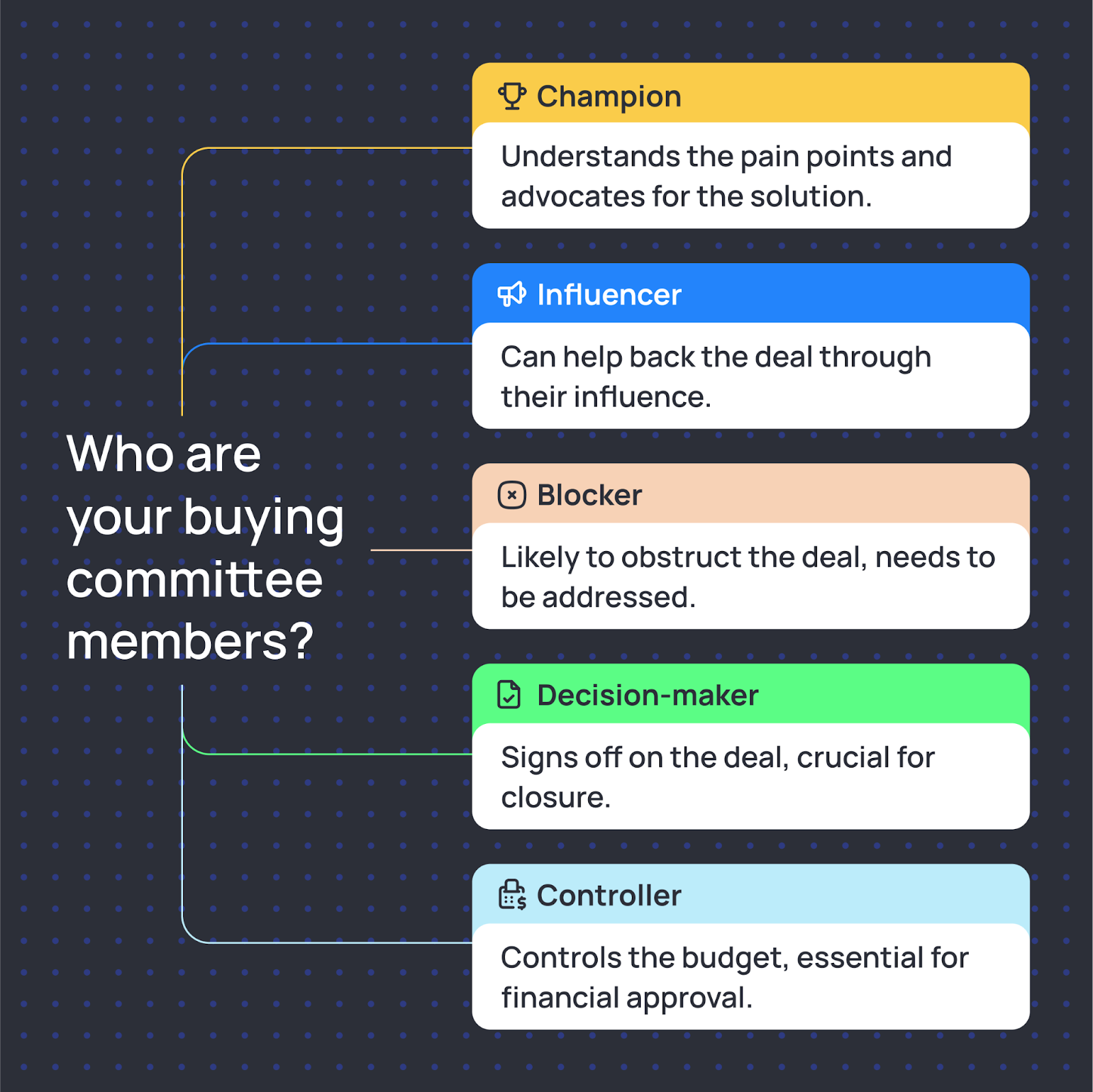
Mid-market and enterprise SaaS purchases rarely depend on one person. Even when one contact begins the conversation, several people may influence evaluation, budget, security, implementation and final approval.
- Champion or user: feels the problem and wants it solved.
- Influencer: shapes how the solution is evaluated.
- Technical or operational stakeholder: checks integrations, workflow and implementation.
- Decision-maker: approves the commercial direction.
- Budget owner: controls or signs off on spend.
- Procurement, security or legal stakeholder: may enter later in larger deals.
Do not contact everyone with the same message. A RevOps leader may care about process and visibility, while a CRO may care more about pipeline efficiency and execution. The account can be the same while the reason for speaking to each person is different.
Step 2: LinkedIn + Email Is the Core Stack for SaaS Outbound
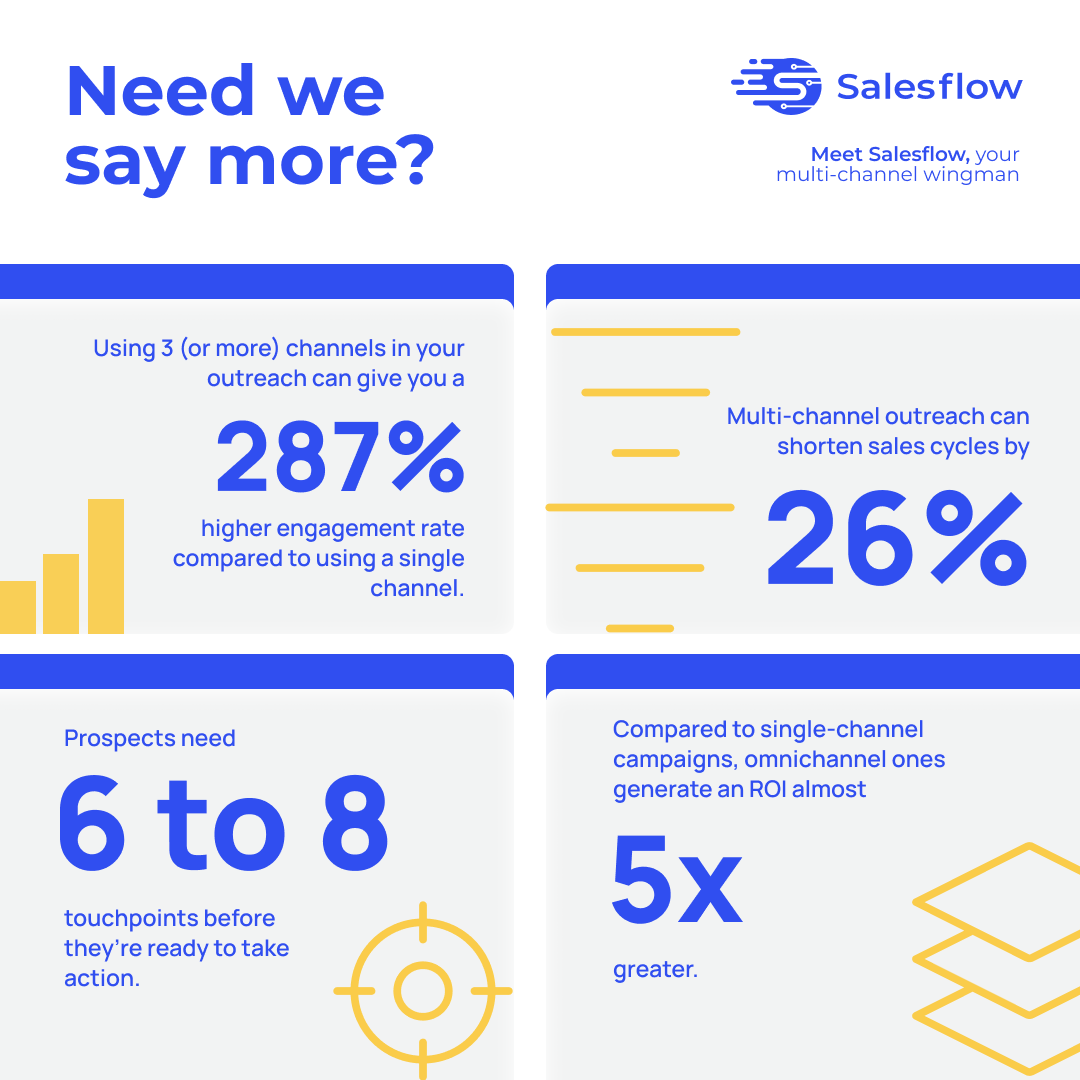
LinkedIn and email can work well together because they give a prospect two different ways to recognise the sender, understand the reason for contact and respond. The useful part is coordination, not assuming one channel universally performs better.
Start with the channel where your buyer is most likely to notice and understand the message. Add the second channel when it provides useful context or creates a more natural follow-up path.
Why Email and LinkedIn Work Well Together
LinkedIn is useful for account research, professional context, role changes, company activity and low-friction relationship building. It gives a rep a clearer picture of who the prospect is before a message is written.
Email is useful when the conversation requires more context, a detailed explanation, a supporting resource or a straightforward way to continue the discussion.
The channels become more useful when they share the same campaign logic. A prospect who replies by email should not keep receiving unnecessary LinkedIn follow-ups simply because two campaigns are running independently.
That is where coordinated workflows matter. One system should understand contact status, replies and next actions across the campaign rather than treating each channel as a separate activity list.
Choose Channel Order by Segment
Avoid rigid assumptions such as "CROs always respond on LinkedIn" or "technical buyers always prefer email." Test the sequence against actual segments.
For one audience, LinkedIn may create familiarity before email. For another, email may start the conversation and LinkedIn may work better as a later touch. Measure positive replies and qualified conversations by segment instead of relying on a universal channel rule.
Step 3: Write Researched Messages Thoughtfully
Good SaaS outbound copy is usually shorter than the internal thinking behind it. The prospect does not need your full product story in the first message. They need a credible reason to understand why you contacted them.
Start with something relevant and verifiable. Then connect it to a problem your company can genuinely help solve. Finally, offer a low-friction next step.
The Three-Part Email Structure
A useful first-touch email can follow this structure:
- 1. Trigger or observation: What happened that makes the outreach timely?
- 2. Relevance: Why might that change create a problem or priority you understand?
- 3. Next step: What simple action would move the conversation forward?
For example:
Saw that your team is expanding sales hiring across two markets. Growth like that can make outbound processes harder to keep consistent across reps.
We help SaaS teams coordinate LinkedIn and email outreach while keeping campaign activity and replies organised.
Worth comparing how you're handling that today?
The message works only if the trigger is real. Never ask AI or an automation platform to invent a funding event, hiring plan, pain point or technology simply to create a personalised opening line.
LinkedIn Connection Notes
A connection request has one job: give the person a credible reason to connect. It does not need to contain the entire pitch.
Example:
Saw your team is expanding outbound this year. We work with SaaS teams going through a similar stage, so I thought it would be useful to connect.
After the connection is accepted, continue the conversation with context instead of immediately dropping a generic product paragraph into the inbox.
A Note on LinkedIn Automation Safety
Before using third-party LinkedIn automation, review LinkedIn's current automated-activity policy. LinkedIn states that it does not allow unauthorised third-party software or browser extensions that scrape, modify or automate activity on its website, and accounts can be restricted when automated or inauthentic activity is detected. Do not publish unofficial daily connection-request numbers as if LinkedIn guarantees them.
If your team evaluates LinkedIn outreach automation tools, compare them alongside platform rules, account controls, message quality, reply handling and your organisation's privacy requirements. Automation should reduce repetitive administration. It should not be presented as a way to bypass platform policies.
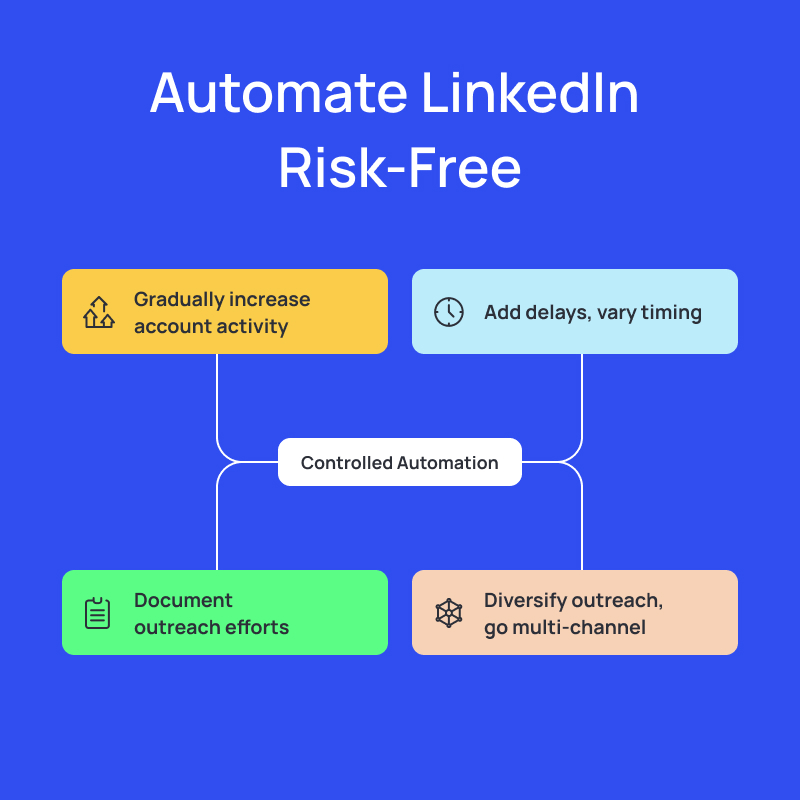
Salesflow's cloud setup handles the technical side: randomised delays and safety caps run in the background. Sign up for a 7-day free trial here.
The Follow-Up Sequence
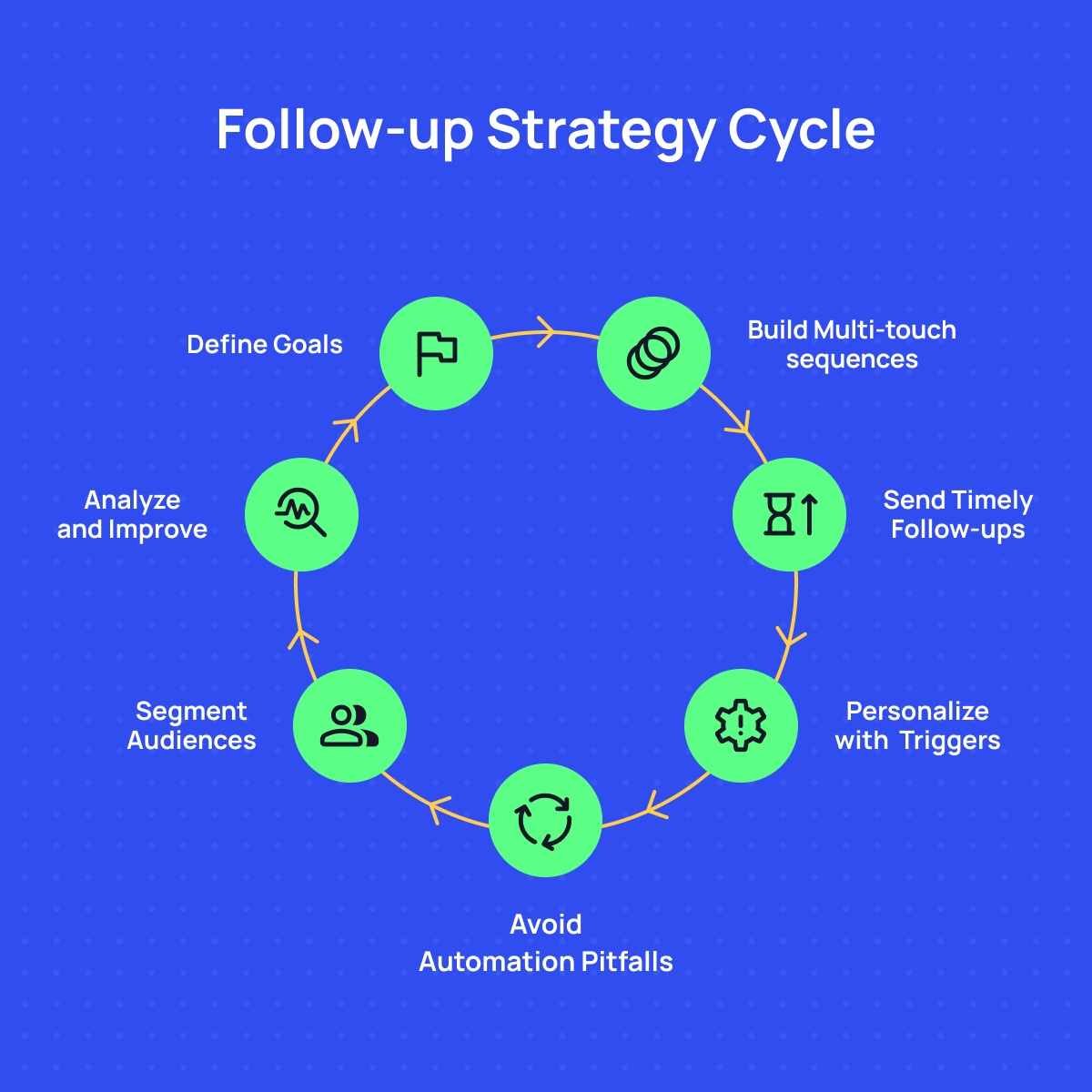
Follow-up matters because a prospect can miss, postpone or deprioritise the first message. There is no universal number of touches that guarantees a reply, so treat any cadence as a starting framework rather than a benchmark.
Do not repeat the same pitch five times. Each follow-up should add something: context, a useful example, an answer to a likely objection, a relevant resource or a clear close-the-loop message.
Stop the sequence when someone replies, opts out or clearly indicates that the conversation is not relevant.
Step 4: The SaaS Outbound Tech Stack
A SaaS outbound stack does not need to become a collection of overlapping tools. Each product should own a clear part of the workflow.
Prospecting and Data
Use LinkedIn Sales Navigator or another prospecting source to identify matched companies and decision-makers. Verify the contact fields you actually need before outreach begins.
Outreach Orchestration
Use Salesflow Dynamic Outreach when LinkedIn and email need to operate within one coordinated workflow. Dynamic Outreach can adjust campaign paths based on available contact data, connection status, engagement and replies.
Scheduling
Give interested prospects an easy next step. A booking link can help when a buyer is ready to meet, but not every message needs to push directly toward a calendar. Match the CTA to the stage of the conversation.
CRM and System of Record
Keep account ownership, conversation history, opportunity stage and follow-up status in the CRM your team already uses. Connect campaign activity back to that system so reporting and ownership do not depend on manual updates.
When evaluating outbound sales automation software, look beyond feature count. Ask whether the platform fits the process you actually want your sales team to run.
Step 5: The 90-Day Outbound Playbook for SaaS Teams
Use this 90-day plan as an operating template, then adjust list size, cadence, channel mix and qualification criteria to match your sales cycle, market and available capacity.
Weeks 1-2: Foundation
- Define the ICP clearly enough that two people on the team would build roughly the same prospect list.
- Build a controlled first list rather than importing thousands of contacts.
- Create a small set of messaging variants based on different triggers or buyer problems.
- Build the initial LinkedIn and email workflow.
- Check every message manually before the first campaign goes live.
Weeks 3-4: First Campaign
- Launch to a controlled segment and watch the inbox closely.
- Track connection acceptance where relevant, replies, positive replies, qualified meetings and the reasons prospects give when they say no.
- Do not change everything after the first few messages. Collect enough evidence to distinguish a targeting problem from a messaging or timing problem.
Weeks 5-8: Iterate
- Group responses by persona, account type and trigger.
- Sharpen the ICP around the segments producing useful conversations.
- Test a new opener, proof point or CTA while keeping other variables stable enough to understand what changed.
- Use negative replies as research. "Already using another solution" tells you something very different from "not a priority this year."
Weeks 9-12: Scale What Is Working
- Increase list size gradually around segments that are producing qualified responses.
- Document the successful workflow so other reps can execute it consistently.
- Add account-based research for strategically important companies where deeper personalisation is justified.
- Keep monitoring meeting quality. Scaling meetings that never become opportunities simply creates more work for the sales team.
On Meeting Quality
A meeting is useful only if there is a realistic path to value for both sides. Define qualification criteria early enough that reps know when a conversation should move forward and when it should not.
Track meetings alongside qualified opportunities and pipeline. A campaign generating fewer meetings can still be the stronger campaign if those conversations consistently involve the right buyers.
Common Mistakes That Kill SaaS Outbound Before It Starts
Targeting the Entire Market
"Any SaaS company with a sales team" is not a useful target definition. Broad targeting usually produces broad messaging. Narrow the audience until your team can explain exactly why each account belongs in the campaign.
Leading With Features
Prospects usually care about the problem before they care about the feature. Start with the commercial or operational issue. Introduce the product only when it helps explain how that issue can be addressed.
Quitting Before You Have Useful Evidence
One unanswered message does not tell you whether the problem is your list, timing, offer or copy. Run a controlled sequence, review reply quality by segment and change one meaningful variable at a time.
Treating Negative Replies as Failures
A relevant negative response can improve your next campaign. Capture objections and look for patterns. They can expose weak positioning, wrong timing, unclear differentiation or an ICP that needs narrowing.
Delegating the Learning Too Early
Founders and sales leaders should remain close to early outbound long enough to hear objections and understand which messages create qualified conversations. Hand execution over once there is a documented process worth repeating.
Pipeline Doesn't Build Itself
Outbound works when targeting, timing, message quality and follow-up operate as one system. A larger send volume cannot compensate for a loose ICP, and automation cannot make an irrelevant message useful.
Build the first version around a narrow audience and a clear reason to contact them now. Measure positive replies, qualified meetings and opportunities by segment. Scale only the parts that continue producing useful conversations.
Ready to coordinate LinkedIn and email without rebuilding separate campaigns for every prospect outcome? Explore Salesflow Dynamic Outreach or start with one focused SaaS segment and test the workflow before scaling.
FAQs:
.svg)
.png)

.png)